
How to Verify NPI Numbers in Bulk
Stale NPIs wreck your outreach and your credibility. Here is how to validate thousands of NPI numbers against CMS data without doing it one at a time.
2026-03-29
There are three ways to verify NPI numbers in bulk, and which one you pick depends on volume. Under 10,000 records, query the free NPPES API at 2-3 requests per second. Above 50,000, download the full NPPES data file and match locally. And before either step, run Luhn checksum validation to throw out structurally invalid numbers in milliseconds. This guide walks through all three methods, what to check beyond bare existence, and how to automate the whole thing. Source: CMS NPPES files.
| Method | Best for | Speed | What it catches |
|---|---|---|---|
| Luhn checksum | Pre-filtering any list size | Instant, runs locally | Verify the measured value and observation date before use. |
| NPPES API | Verify the measured value and observation date before use. | Verify the measured value and observation date before use. | Nonexistent NPIs, deactivations, name and classification mismatches |
| NPPES bulk file | Verify the measured value and observation date before use. | Verify the measured value and observation date before use. | Everything the API catches, plus full-database comparisons |
Why Bulk NPI Verification Matters
The CMS NPI Registry contains over 7 million NPI records. Roughly 300,000-400,000 records change in some way every year: address updates, classification changes, deactivations, and reactivations. If you are working with a provider list that has not been validated against current CMS data, you are guaranteed to have errors.
Method 1: The NPPES API
CMS provides a free API for querying the NPI registry. This is the most reliable method for bulk verification because you are checking directly against the authoritative source.
How the API Works
The NPPES API endpoint is https://npiregistry.cms.hhs.gov/api/. You can query by NPI number, provider name, specialty classifications, state, or a combination of fields. The API returns JSON with the full provider record including name, address, classification, enumeration date, and deactivation status.
Key parameters for bulk verification:
- number: The 10-digit NPI number you want to verify Source: CMS NPPES files.
- Keep measured values only when the source, scope, and observation date travel with the record.
Rate Limits and Practical Throughput
CMS publishes no official rate limit for the NPPES API. In practice, the ceiling is roughly 2-3 requests per second before you start getting throttled or receiving timeout errors. At that rate, verifying 10,000 NPIs takes approximately 60-90 minutes. Source: CMS NPPES files.
Tips for maximizing throughput:
- Implement retry logic with exponential backoff for failed requests
- Run verification during off-peak hours (evenings and weekends) when the API is less loaded
- Cache results locally so you do not re-verify NPIs you already checked recently
Method 2: NPPES Bulk Data Download
For large-scale verification (50,000+ records), the API approach is too slow. Instead, download the full NPPES data dissemination file and run your verification locally.
What You Get
For initial verification, download the full file. For ongoing maintenance, process the weekly updates.
Setting Up Local Verification
The NPPES file is a pipe-delimited CSV with over 300 columns. For verification purposes, you only need a subset: Source: CMS NPPES files.
- Provider First Name / Last Name: For name matching
- Provider Business Practice Location Address: Current practice address
- Healthcare Provider specialty classifications: Specialty classification
- NPI Deactivation Date: If populated, the NPI is deactivated
- NPI Reactivation Date: If populated after a deactivation, the NPI was reactivated
Load the relevant columns into a database (PostgreSQL, SQLite, or even a pandas DataFrame for smaller datasets). Then join your provider list against the NPPES data on NPI number. Any NPI in your list that does not match, or matches a deactivated record, gets flagged.
Method 3: NPI Checksum Validation
Before you even hit the CMS API or database, you can catch invalid NPIs using the Luhn algorithm. NPI numbers use a modified version of the Luhn check digit formula (the same algorithm used to validate credit card numbers).
The process:
- If the check digit is valid, the NPI is structurally correct
- If it fails, the NPI is invalid (no need to look it up)
Checksum validation catches typos, transposed digits, and completely fabricated NPIs. It does not confirm that the NPI is active or that it belongs to the provider you think it does. Use it as a fast pre-filter before running API or database verification.
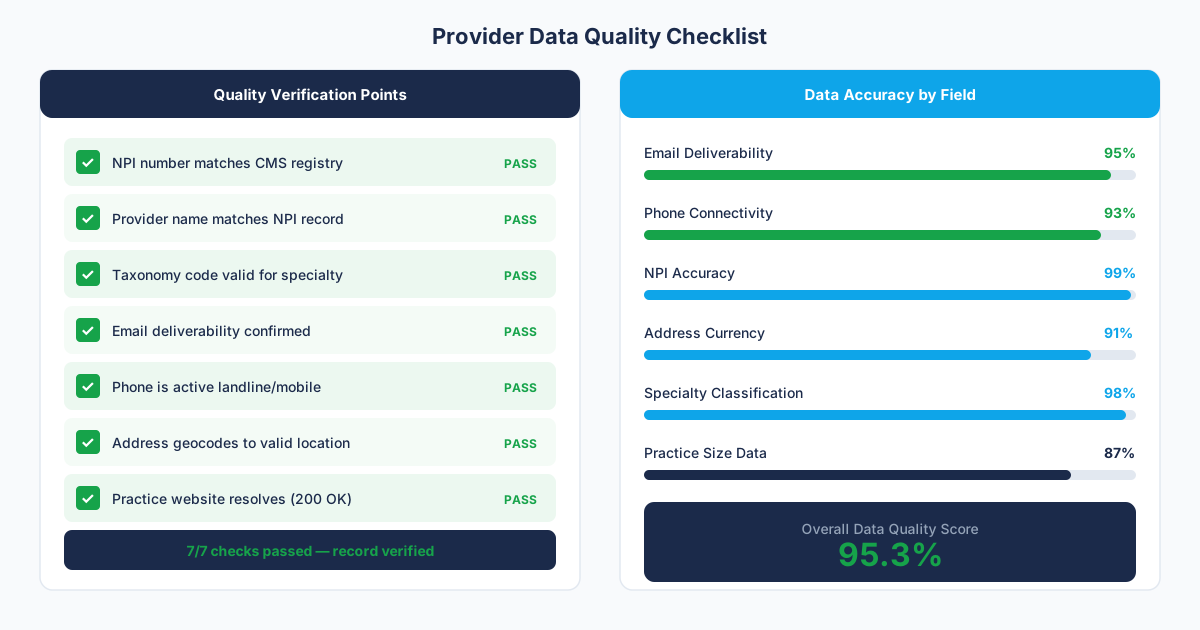
What to Check Beyond "Does This NPI Exist?"
Existence is the minimum bar. A thorough NPI verification checks several additional fields:
Deactivation Status
An NPI can be deactivated for several reasons: the provider retired, lost their license, died, or the NPI was issued in error. The NPPES record includes both deactivation and reactivation dates. Check that there is no deactivation date, or that any deactivation was followed by a reactivation.
Name Match
Verify that the name in your data matches the name on the NPI record. Mismatches happen when data vendors assign the wrong NPI to a provider (especially common with common names like "John Smith" or "David Lee"). Use fuzzy matching to account for middle initials, suffixes, and name variations; however, flag exact mismatches for manual review.
classification Match
Confirm that the specialty classifications on the NPI record aligns with the specialty in your data. If your list says a provider is a dermatologist but their NPI classification is internal medicine, something is wrong. Providers can have multiple specialty classifications, so check the relevantm; however, flag records where none of the specialty classifications match your expected specialty.
Address Currency
Compare the practice address in your data to the practice address on the NPI record. Address mismatches often indicate that the provider has moved to a new practice but your data has not been updated. Note that NPI addresses are self-reported and may lag actual moves by months or years, so an address mismatch does not automatically mean your data is wrong. However, it does mean you should flag the record for additional verification.
Common NPI Data Errors and How to Handle Them
After verifying millions of NPI records, these are the errors that come up most often:
- Transposed digits: Two adjacent digits are swapped. Luhn validation catches most of these. When the checksum passes but the NPI returns the wrong provider, check for single-digit transpositions.
- Duplicate NPIs for the same provider: Some providers have multiple active NPIs, usually because they registered a new one when changing practices instead of updating the existing one. CMS tries to catch these; however, some slip through.
- Stale specialty classifications: A provider changed their practice focus but may not be updated their specialty classifications with CMS. The NPI is valid; however, the specialty data is outdated.
Building an Automated Verification Pipeline
For teams that maintain ongoing provider lists, manual verification runs do not scale. Here is a practical pipeline architecture:
- Weekly NPPES delta download: Automatically download the weekly NPPES update file Monday. Parse the changes and update your local reference database.
- Nightly Luhn pre-check: Run checksum validation on any new records added to your system during the day. Flag failures immediately.
- Rolling API verification: Verify a batch of records against the NPPES API daily, cycling through your full database over 30 days. This catches deactivations and changes that the weekly file might miss due to timing. Source: CMS NPPES files.
- Quarterly full refresh: Download the complete NPPES file quarterly and run a full comparison against your database. This catches any records that slipped through the incremental processes.
- Change alerts: When a verified NPI record changes (address, classification, deactivation), trigger an alert to the account owner or data steward so they can update downstream systems.
When to Skip DIY and Use a Verified Data Source
Building and maintaining an NPI verification pipeline is worthwhile if your organization manages tens of thousands of provider records and has engineering resources to maintain the infrastructure. If you are a sales team that needs a verified provider list for a campaign, the time and effort of building this pipeline from scratch does not make sense.
If NPI verification is part of a project scope, define the CMS source date, entity-match fields, accepted status values, and treatment of conflicts before work begins. The delivered file should preserve unmatched and ambiguous outcomes so the buyer can inspect the result.
For teams that want to verify their existing data, we can scope a verification project on your current list. If you are still choosing where your provider data comes from in the first place, our healthcare data vendor comparison covers how the major sources handle NPI verification, and our guide to B2B healthcare lead generation shows where verified NPIs fit in the broader outbound motion.
Frequently Asked Questions
Does the NPI Registry API have rate limits?
CMS publishes no official rate limit for the NPPES API. In practice the ceiling is 2-3 requests per second before throttling and timeouts start. For bulk verification, downloading the full NPPES data file and running checks locally is faster and more reliable than the API. Source: CMS NPPES files.
Can an NPI number be reactivated after deactivation?
Yes. Deactivated NPIs can be reactivated by the provider through CMS. The NPPES record will show both a deactivation date and a reactivation date. When verifying NPIs, check that the most recent status-change date indicates an active status, rather than only checking for the presence of a deactivation date.
Is there a free bulk NPI lookup tool?
CMS provides two free options: the NPPES API (npiregistry.cms.hhs.gov/api/) for programmatic lookups, and the NPPES data dissemination file for local batch matching. There is no official CMS web tool that accepts a CSV upload. Third-party sites that offer free bulk uploads are wrapping one of these two sources, so for anything sensitive, go directly to CMS.
Which NPPES fields should a bulk check retain?
Keep the submitted identifier, returned entity type, status fields, names, classifications, addresses, response date, and any unmatched or ambiguous outcome. Preserve the raw response for audit.
How should API and bulk-file results be compared?
Freeze the input list and source dates, normalize identifiers the same way, and compare matched, unmatched, deactivated, and conflicting records. Investigate differences before changing the production rule.
Sources and References
Related Resources
Get the Provider Data You Need
Tell us what you're looking for. We'll build a custom list matched to your target market.
Trusted by healthcare sales teams, medical device companies, and health IT vendors across the US.