
NPI Database: A Complete Guide for Healthcare Marketers
The NPI database is free, massive, and wildly misunderstood. Here's what healthcare marketers need to know before building campaigns around it.
2026-03-29
What the NPI Database Is (and What It Isn't)
The National Provider Identifier database is maintained by CMS through the National Plan and Provider Enumeration System (NPPES). Its September 2026 file (retrieved 13 September 2026) contains 9,798,758 records, 9,443,429 of them active. Every healthcare provider who bills federal programs has one. Many who don't bill federal programs have one too, because commercial payers and clearinghouses require it.
For healthcare marketers, the NPI database looks like a goldmine at first glance. Millions of providers, neatly organized by specialty classifications, with addresses and phone numbers attached. Free to download. Updated monthly.
Then you try to build a marketing campaign from it.
The problems start immediately. Addresses are often mailing addresses, not practice locations. Phone numbers route to billing departments or answering services. There are no email addresses. No ownership information. No way to tell if a provider is still practicing at the listed location or moved three years ago. And the specialty classifications, while useful for broad categorization, can't distinguish between a cosmetic dermatologist running a cash-pay medspa and a medical dermatologist treating psoriasis in a hospital outpatient clinic.
The NPI database is a directory. It's not a marketing database. That distinction matters more than most people realize when they're planning outreach.
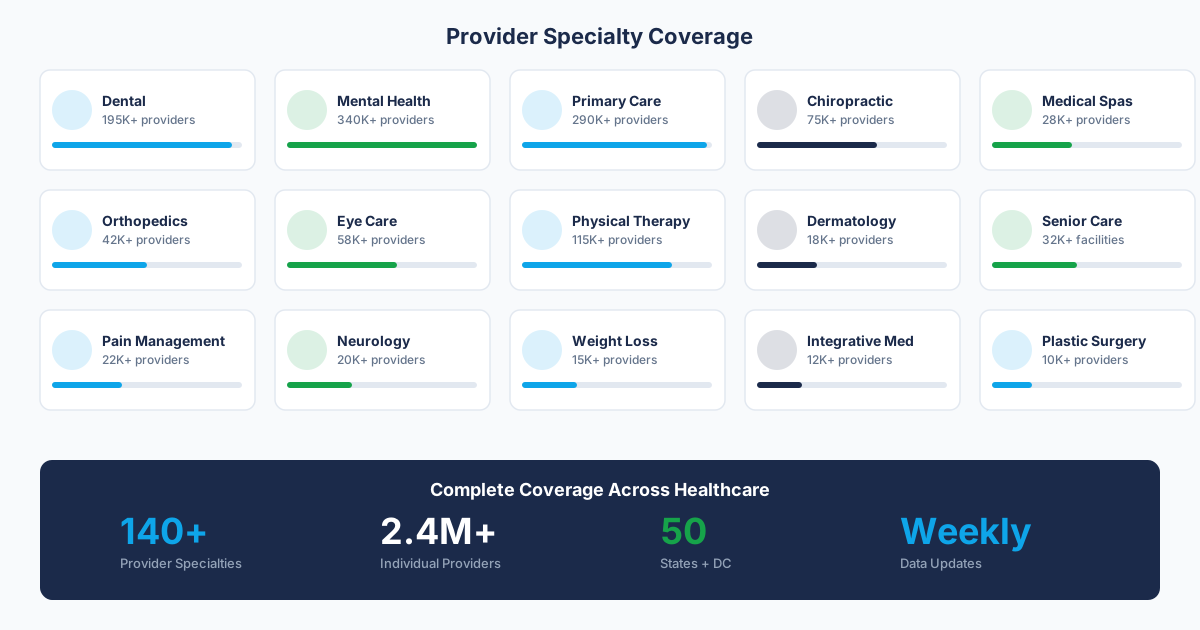
What You Get from the NPI Download
The full NPPES data dissemination file is available from CMS as a monthly download. It's a large CSV (roughly 8GB uncompressed). Here's what each record contains:
Useful Fields for Marketing
- NPI Number: The 10-digit unique identifier. This is your primary key for matching across data sources. Every provider has exactly one.
- Provider Name: For Type 1 (individual) NPIs, you get first name, last name, and credentials. For Type 2 (organizational), you get the business name.
- specialty classifications: Up to 15 healthcare specialty classifications per provider. The primary classification is flagged. These map to the standard provider classification system code set.
- Practice Location Address: Street, city, state, ZIP. Sometimes this is the actual office. Sometimes it's a PO Box or billing address.
- Phone Number: Usually the main office line. Almost never a direct dial for the provider.
- Enumeration Date: When the NPI was assigned. Useful for identifying newer practices.
- Last Update Date: When the record was last modified. Useful for freshness assessment.
Fields That Look Useful But Often Aren't
- Authorized Official: For Type 2 NPIs, this is the person who applied for the NPI. It could be the practice owner, a billing manager, or a consultant who set up the entity. Don't assume this person is a decision-maker.
- Other Provider Identifiers: Legacy identifiers from before the NPI system. Mostly irrelevant for marketing.
- Parent Organization: Sometimes populated, mostly empty. When filled, it can indicate hospital affiliations, but coverage is spotty.
The Five Limitations That Kill Marketing Campaigns
We've worked with dozens of teams that started with the NPI database as their primary data source. The same five problems come up every time.
1. No Email Addresses
This is the most obvious gap. The NPI database has zero email data. For any team running email outreach (which is most of them), you need a separate enrichment source. And the match rates between NPI records and commercial email databases are lower than you'd expect. We typically see 40-55% match rates for verified, deliverable business email addresses. Personal emails are easier to find but create compliance questions.
If email is your primary outreach channel, the NPI database gives you a target list. It doesn't give you a way to reach those targets. You'll need to invest in contact data enrichment to close that gap.
2. Stale Address Data
Providers are required to update their NPI information within 30 days of a change. Compliance with that requirement is... Uneven. CMS doesn't aggressively enforce it. The result is a database with a meaningful percentage of outdated addresses.
How meaningful? When we've audited NPI address data against verified practice locations, we find 15-25% discrepancy rates depending on the specialty. Primary care and family medicine tend to be more accurate (larger, more stable practices). Solo practitioners in specialties like chiropractic and integrative medicine have higher error rates because they change locations more frequently and are less likely to update the registry.
3. specialty classifications Are Too Broad
The industry-standard classification has over 800 codes, which sounds granular. In practice, a few dozen codes cover the vast majority of providers, and those codes are too broad for targeted marketing.
Example: specialty classifications 207Q00000X covers "Family Medicine." That includes traditional family practice doctors, urgent care physicians, concierge medicine practices, and rural health clinic providers. If you're selling an EHR designed for urgent care workflows, the family medicine classification puts your target in a bucket with tens of thousands of providers who will never be interested.
The workaround is combining specialty classifications with other signals. Practice name analysis, website scraping for service offerings, claims data (if accessible), and geographic filtering can all help narrow a broad classification into a workable segment. But that's enrichment work the NPI database doesn't do for you.
4. No Practice Size or Revenue Indicators
The NPI database doesn't tell you how many providers work at a practice, how many locations they operate, or anything about their revenue. For B2B teams with minimum deal sizes or specific practice-size requirements, this is a major gap.
A dental practice with 2 providers and a dental practice with 20 providers look identical in the NPI database. Your sales pitch, pricing, and decision-maker approach should be completely different for each.
5. Dead NPIs Stay in the File
When a provider retires, dies, or deactivates their NPI, the record stays in the database with a deactivation flag. But deactivation isn't instant, and not all inactive providers are properly flagged. We've encountered records where the provider closed their practice two or more years ago but the NPI still shows as active because no one filed the deactivation paperwork.
For marketers, this means the raw NPI file overstates the addressable market. Depending on the specialty and geography, 5-10% of "active" NPIs in the file may correspond to providers who aren't actively practicing.
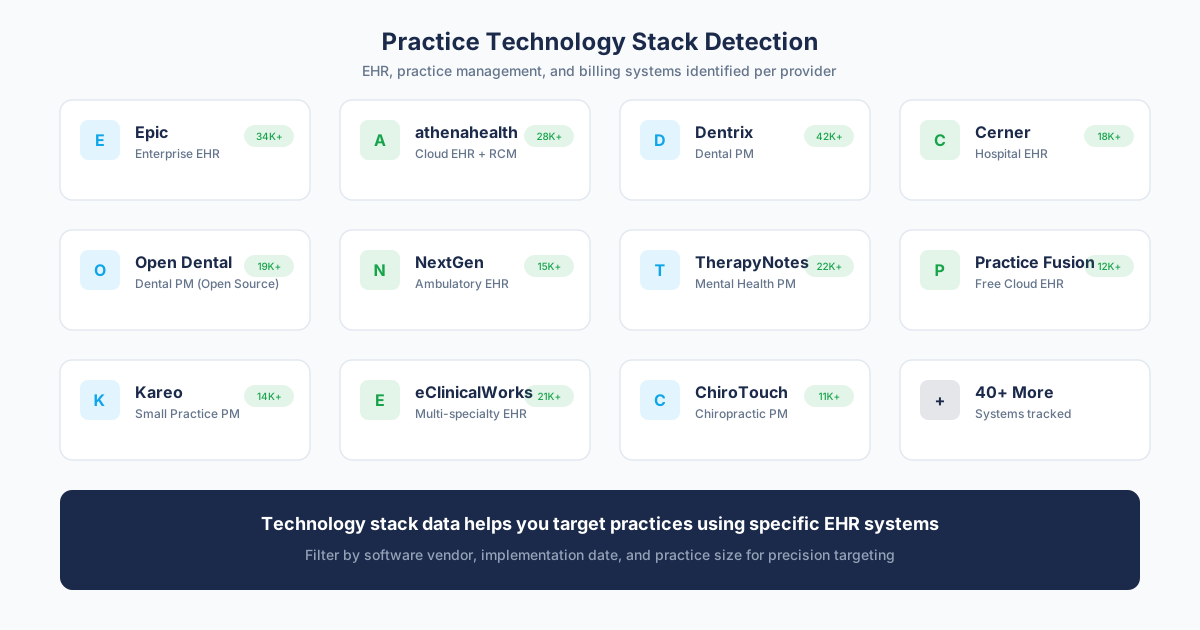
How to Use the NPI Database for Marketing (The Right Way)
Despite the limitations, the NPI database is still the best starting point for healthcare marketing campaigns. The key is treating it as a foundation to build on, not a finished product.
Step 1: Filter to Your Target classification
Start by pulling records that match your target specialty classifications. Be inclusive at this stage. If you're targeting dermatologists, pull all dermatology-related taxonomies (207N00000X for general derm, 207NI0002X for clinical and laboratory immunology, 207NP0225X for pediatric derm, etc.).
You'll filter more precisely in the enrichment stage. Casting a wider net here ensures you don't miss providers who are miscategorized or use secondary specialty classifications.
Step 2: Geographic Filtering
Apply your territory or market filters. The NPI database includes both practice location and mailing addresses. Use the practice location address (fields labeled "Provider Business Practice Location") for geographic filtering. The mailing address is often a billing service or PO Box in a different state.
Step 3: Type 1 vs. Type 2 Strategy
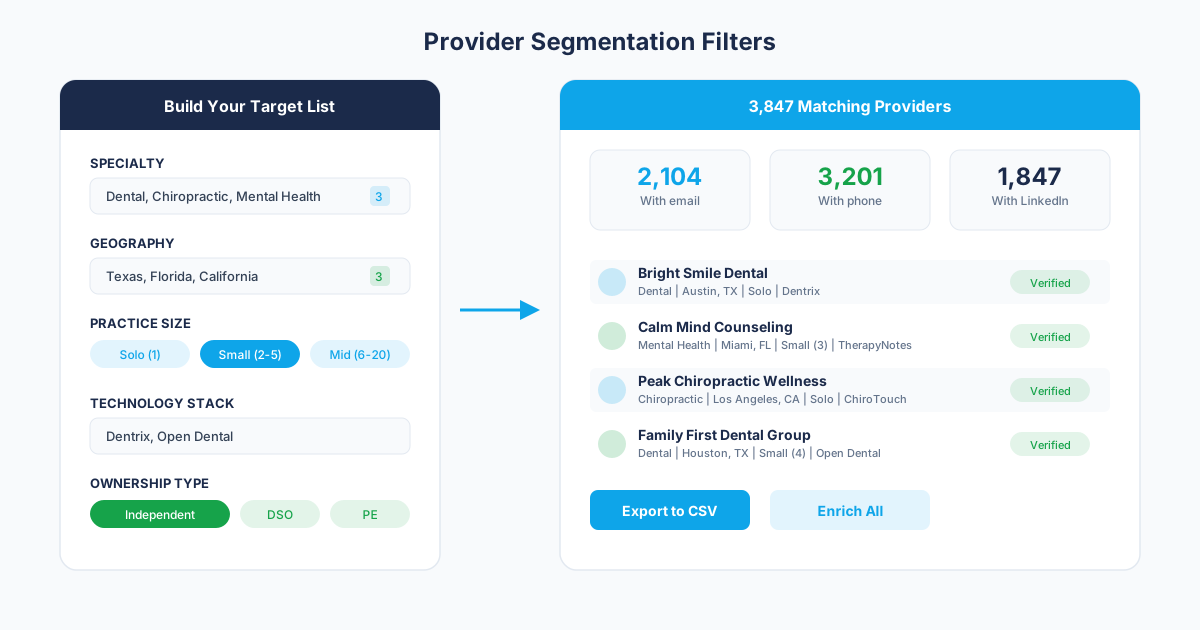
Decide whether you need individual providers (Type 1) or organizations (Type 2), or both. For most B2B marketing, you want Type 2 records as your account list, then enrich with Type 1 individual contacts at each organization.
Exception: if your product is sold directly to individual providers (CME platforms, malpractice insurance, locum tenens opportunities), start with Type 1 records.
Step 4: Enrich, Verify, and Segment
This is where the NPI database stops and your data enrichment strategy begins. The NPI gave you a universe of providers in your target specialty and geography. Now you need to add the fields that make marketing possible:
- Verified email addresses (business domain preferred)
- Direct phone numbers or cell phones for decision-makers
- Practice owner and key staff names with roles
- Practice size indicators (provider count, location count)
- Ownership structure (independent, hospital-owned, PE-backed)
- Technology stack (EHR, practice management system)
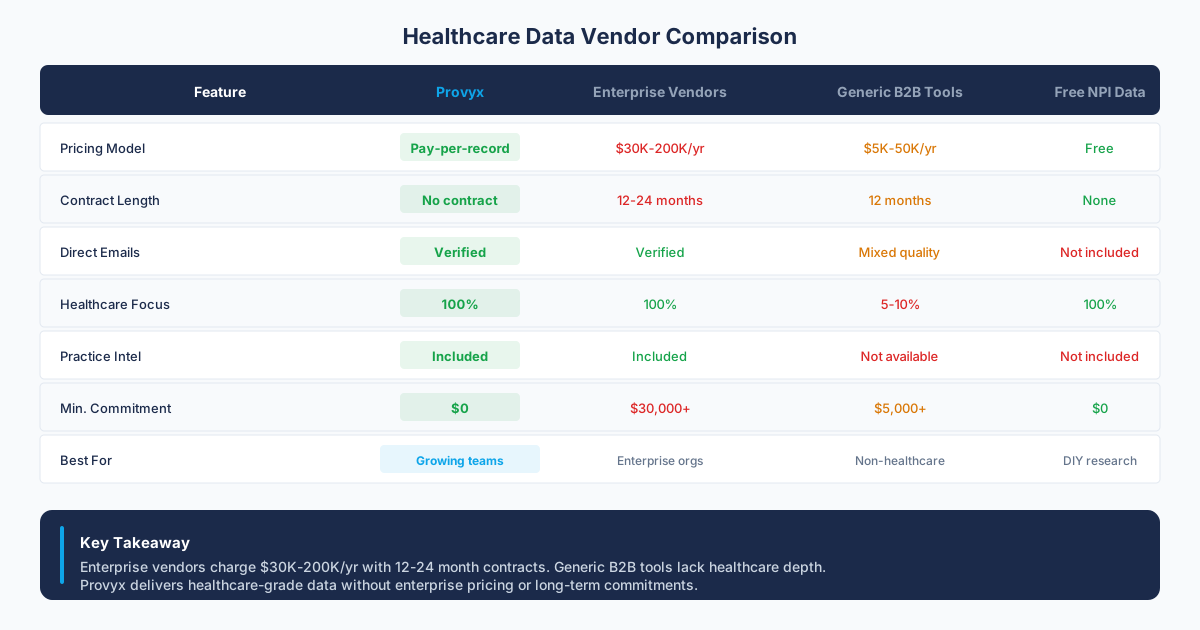
You can build this enrichment pipeline yourself using multiple data sources, or work with a healthcare-specific data vendor that delivers pre-enriched records. The vendor route is faster but costs more per record. The DIY route is cheaper per record but requires significant technical investment and ongoing maintenance.
NPI Database vs. Commercial Provider Data
The question we hear most often: "Why would I pay for provider data when the NPI database is free?"
Fair question. Here's the honest answer: you're paying for enrichment, verification, and structure. The raw NPI data is free. Turning it into something your sales team can use is not.
A commercial provider data product should include everything in the NPI database plus:
- Email addresses with deliverability verification
- Multiple contacts per practice with role identification
- Address verification against USPS standards
- Phone number validation (active, properly routed)
- Practice size and ownership enrichment
- Regular refresh cycles (monthly or better)
If a vendor is just reselling NPI data with minimal enrichment, that's not worth paying for. The value should be in the layers added on top. Ask any vendor what percentage of their records have verified email addresses, how they validate phone numbers, and when each record was last verified. Those answers tell you whether you're getting value beyond the free NPI download.
For a detailed comparison, read our NPI vs. Commercial provider data analysis.
Advanced NPI Database Tactics
Cross-Referencing with State Licensing Boards
State licensing boards maintain their own provider directories with data that doesn't appear in the NPI database. License status, disciplinary actions, practice addresses registered with the state, and sometimes ownership information. Cross-referencing NPI data with state boards can catch providers whose NPI address is outdated but whose state license has the current location.
Using Enumeration Dates for Prospecting
New NPI registrations can signal new practice openings. If you sell to newly established practices (equipment vendors, practice management software, credentialing services), monitoring new NPI enumerations gives you a prospecting trigger. Filter the monthly NPPES updates for new Type 2 registrations in your target specialty and geography. These practices are in active buying mode for the first 6-12 months.
Deactivation Monitoring for Competitive Intelligence
NPI deactivations can indicate practice closures, mergers, or ownership changes. If a competitor's customer deactivates their NPI, that could mean they're consolidating under a new entity (and might be re-evaluating vendors) or closing (and their patients are flowing to nearby practices that might need your solution).
Common Mistakes Healthcare Marketers Make with NPI Data
After years of working with NPI data across thousands of campaigns, these are the patterns that keep causing problems:
- Treating the NPI file as a "done" list.: It's a starting point. Loading it into your CRM without enrichment produces terrible campaign metrics.
- Ignoring Type 1 vs. Type 2 distinctions.: Sending a "Dear Practice Administrator" email to an individual provider NPI makes your outreach look uninformed.
- Over-relying on specialty classifications for targeting.: specialty classifications indicate training and self-reported specialty. They don't indicate current practice focus, services offered, or patient population served.
- Skipping deduplication.: Many providers have both a Type 1 and Type 2 NPI. Some have multiple Type 2 NPIs for different practice locations. Without deduplication, your campaigns will hit the same people multiple times through different records.
- Not validating before outreach.: Even if you're using the latest NPPES download, some percentage of records are outdated. Validation before loading prevents bounced emails, disconnected calls, and CRM pollution.
The NPI database is the single most valuable free resource for healthcare marketers. It just requires work to convert it from a registry into a marketing tool. Teams that invest in that conversion build campaigns that outperform competitors who either skip the NPI entirely (overpaying for commercial data they could filter themselves) or use it raw (wasting time on unvalidated, incomplete records).
Which camp is your team in?
Frequently Asked Questions
Is the NPI database free to download?
Yes. CMS provides the full NPPES data dissemination file as a free monthly download at download.cms.gov. The file contains all active and deactivated NPI records. There is no cost to access it, and no registration required beyond agreeing to the terms of use.
How often is the NPI database updated?
CMS releases updated NPPES files monthly, typically in the first week of the month. However, individual provider records within the database update on a rolling basis as providers submit changes. The monthly file is a snapshot, not a real-time feed.
Can I use NPI data for email marketing?
The NPI database does not contain email addresses. To run email campaigns targeting healthcare providers, you need to enrich NPI records with email data from commercial sources, web scraping, or a healthcare data vendor. Match rates for verified business emails typically range from 40-55% depending on the specialty.
What is the difference between Type 1 and Type 2 NPI numbers?
Type 1 NPIs are assigned to individual healthcare providers (doctors, nurses, therapists). Type 2 NPIs are assigned to organizations (practices, clinics, hospitals, labs). For B2B marketing, Type 2 records represent your accounts, while Type 1 records represent the individual contacts within those accounts.
Sources and References
- CMS NPI Registry
- NPPES Data Dissemination
- standard provider classification system
Related Resources
Get the Provider Data You Need
Tell us what you're looking for. We'll build a custom list matched to your target market.
Trusted by healthcare sales teams, medical device companies, and health IT vendors across the US.