Provyx vs. ZoomInfo
Compare ZoomInfo and Provyx against the same use case, fields, evidence standard, and delivery workflow. Review the current ZoomInfo product documentation alongside the written Provyx scope before deciding.
Updated April 2026
How should a healthcare team compare Provyx and ZoomInfo?
Choose between them based on the records and workflow your team needs. Provyx focuses on healthcare-provider identity, specialty, practice, and business-contact fields. ZoomInfo may fit a team prospecting across multiple industries that also needs platform workflows. Test both against the same representative sample and obtain current written commercial terms before making the decision.
ZoomInfo and Provyx Evaluation Inputs
ZoomInfo vs. Provyx at a Glance
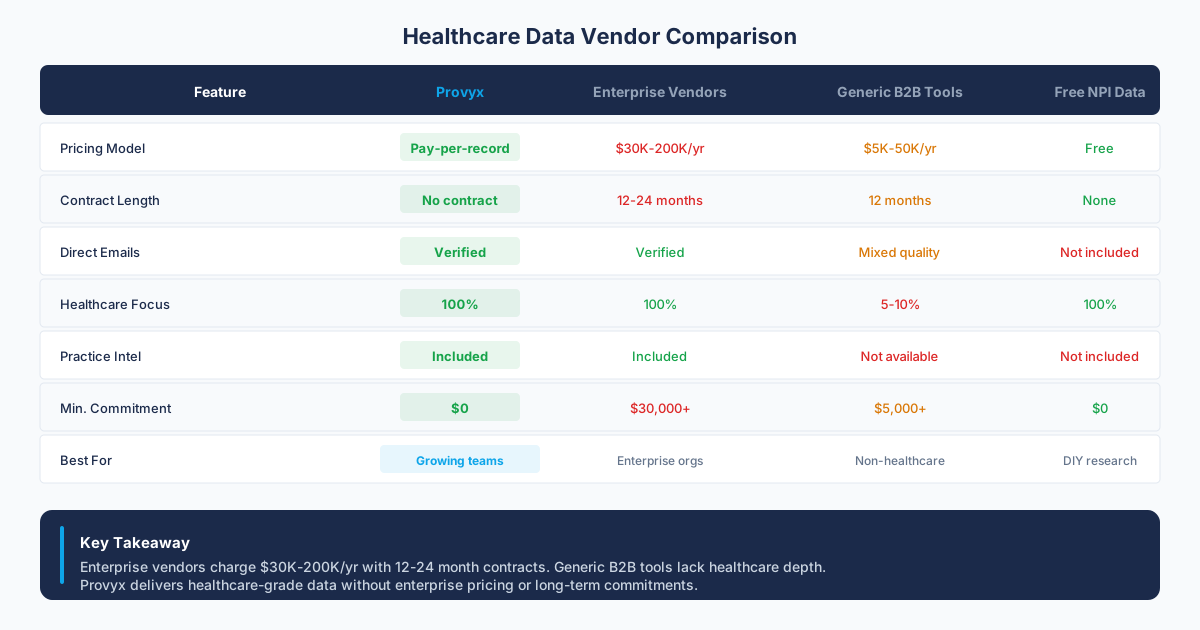
| Factor | ZoomInfo | Provyx |
|---|---|---|
| Starting Price | Confirm in current vendor documentation or a written quote | Verify the measured value and observation date before use. |
| Contract Terms | Confirm in current vendor documentation or a written quote | |
| Healthcare Focus | Verify the measured value and observation date before use. | Verify the measured value and observation date before use. |
| NPI Verification | Not available No NPI | Every record NPI-Verified |
| specialty filtering | Not available No classification | Verify the measured value and observation date before use. |
| Data Delivery | Platform access Seat-Based | CSV or Excel Flexible |
| Best For | Multi-industry enterprise sales teams | Teams selling exclusively into healthcare |
| Key Risk | Healthcare only No Other Verticals |
ZoomInfo

ZoomInfo
Contract Risk
ZoomInfo Product Scope
The platform's core value proposition is breadth. If you're building account lists that span manufacturing, financial services, technology, and healthcare simultaneously, ZoomInfo gives you a single interface to do that. You get access to org charts, direct-dial phone numbers, verified email addresses, and website visitor tracking through its suite of products (SalesOS, MarketingOS, TalentOS).
For healthcare specifically, ZoomInfo does include records for hospitals, clinics, physician practices, and healthcare executives. You can filter by SIC and NAICS codes related to healthcare, and you can layer on intent signals to identify organizations that are actively researching topics related to your solution. The data is refreshed on a rolling basis through a combination of web scraping, email pattern analysis, user-contributed data, and manual research.
ZoomInfo also provides workflow automation tools, conversation intelligence (through its Chorus acquisition), and engagement tracking. This is designed to be an all-in-one revenue operations platform. That scope is a real strength for organizations whose go-to-market motion spans multiple verticals.
The platform's data collection methods include a contributor network of users who install a browser extension or email plugin. In exchange for free or discounted access, these users share contact data from their email headers and address books. ZoomInfo also crawls public websites, SEC filings, job postings, and social media profiles to build and update its records. For industries where professionals actively maintain public profiles and change jobs in patterns that leave digital trails, this methodology works well. For healthcare, where many providers don't have LinkedIn profiles and practice information is scattered across state licensing boards and federal registries, the methodology has blind spots.
Pricing and Contracts
Where ZoomInfo Falls Short for Healthcare
The gaps aren't about data quality in an absolute sense. ZoomInfo is good at what it does. The gaps are about specificity.
No NPI verification. The National Provider Identifier is the universal key for identifying healthcare providers in the United States. Every physician, nurse practitioner, dentist, and clinical professional who bills federal programs has one, and it's maintained by CMS in a publicly searchable registry. ZoomInfo doesn't match its records against NPI data. That means you can't confirm whether a contact is an active, licensed provider, and you can't cross-reference with the specialty classifications that define their specialty.
Practice-level intelligence is thin. ZoomInfo's company records are built around legal entities and corporate hierarchies. Healthcare doesn't always organize that way. A physician might practice at two hospitals, own a separate outpatient surgery center, and bill under a third entity. ZoomInfo's data model isn't designed to capture those relationships. You often end up with a hospital system's corporate headquarters address rather than the actual clinic location where a provider sees patients. Source: ZoomInfo product documentation.
Stale specialty data. Physicians change practice locations, retire, or shift specialties more often than executives change companies. ZoomInfo's refresh cycle, which works well for tracking job changes at tech companies, doesn't always keep pace with the churn in healthcare provider directories. Users targeting healthcare frequently report higher bounce rates on emails and outdated phone numbers compared to their results in other industries. Source: https://www.zoominfo.com/products/sales.
Compliance and data sourcing concerns in healthcare. ZoomInfo's contributor network model, where users share contact data from their inboxes in exchange for platform access, raises questions in regulated industries. Healthcare organizations are often cautious about how provider contact information is collected and shared. While ZoomInfo's data collection is legal, the sourcing methodology doesn't align with the expectations many healthcare compliance teams have about where their provider contact lists originate. If your compliance team asks "where did this data come from," the answer with ZoomInfo is more complex than it is with a platform that sources exclusively from public registries, business listings, and commercial databases. Source: ZoomInfo product documentation.
✓ Strengths
- Strong intent data and website visitor tracking
- Reliable CRM integrations and workflow automation
- Keep measured values only when the source, scope, and observation date travel with the record.
- Well-established enterprise sales infrastructure
✗ Weaknesses
- No NPI verification for healthcare providers
- No specialty classification filtering for clinical specialties
- Practice-level data (direct lines, fax) often missing
Provyx

Provyx
What Provyx Delivers
Provyx is a healthcare provider business data platform. This is its focus. Provyx does not sell access to a prebuilt database snapshot. Each list starts after the buyer approves the project, then the delivered fields are checked again at handoff. There's no intent data for SaaS companies, no technographic signals for e-commerce brands, and no org charts for financial institutions. Each delivered Provyx record represents a healthcare provider or a practice location, and the reviewed records are verified against the National Provider Identifier Registry maintained by the Centers for Medicare and Medicaid Services.
The database covers physicians, nurse practitioners, physician assistants, dentists, optometrists, chiropractors, physical therapists, behavioral health providers, and other licensed clinicians across the United States. Records include NPI numbers, specialty classifications (using the industry-standard classification system), practice addresses, phone numbers, email addresses, affiliated organizations, and, where available, prescribing behavior indicators and referral patterns.
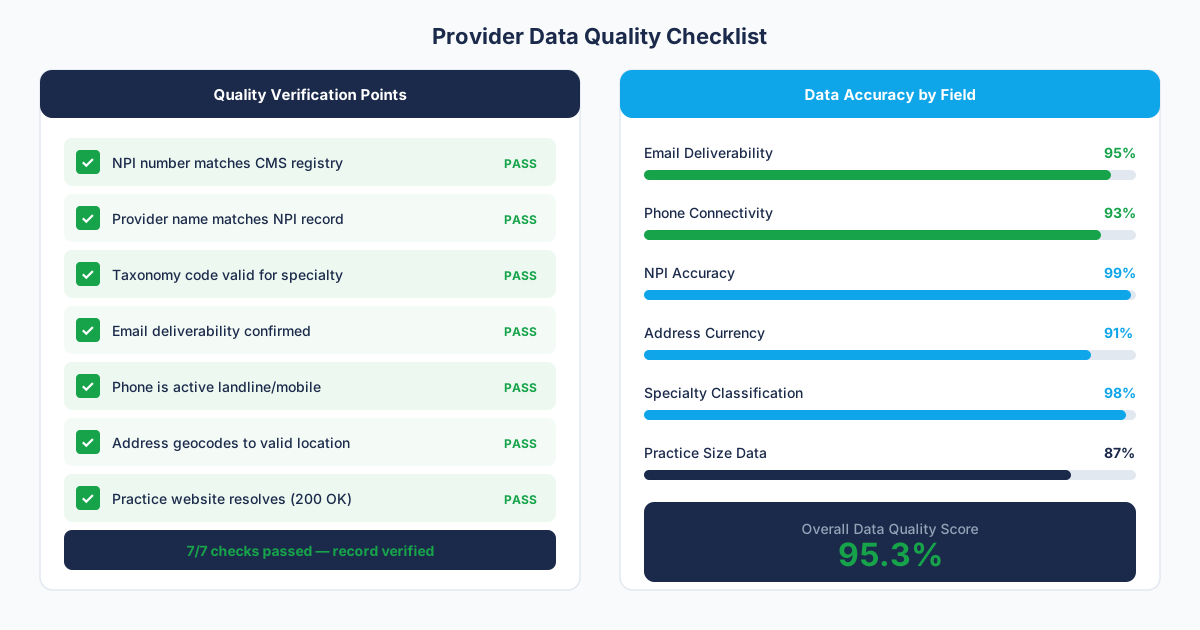
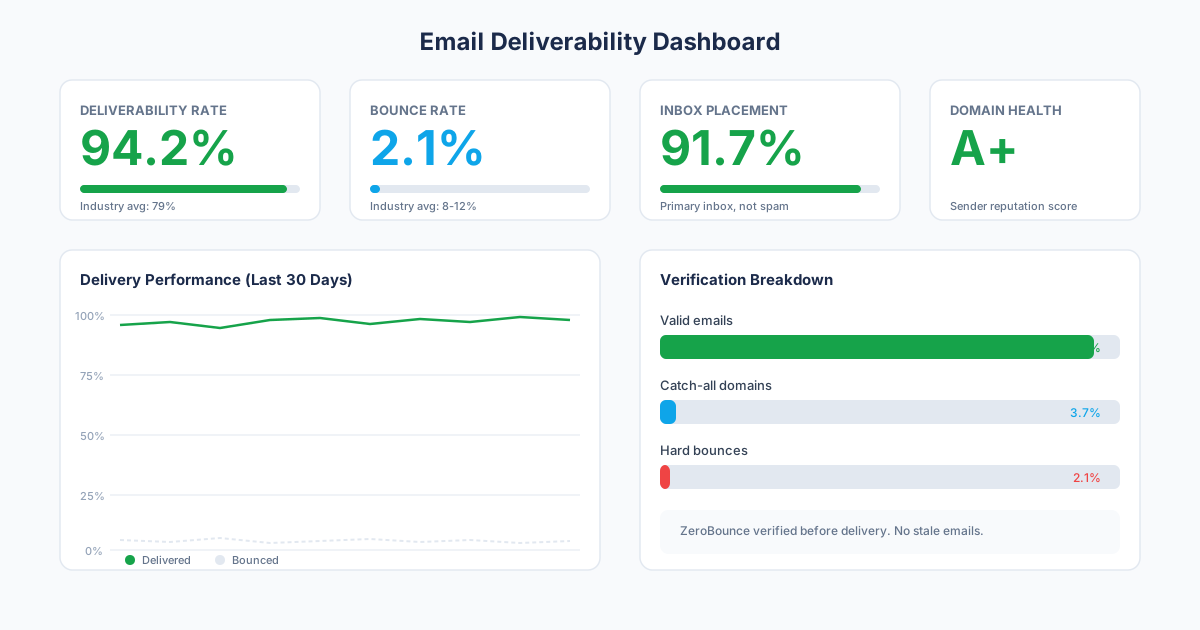
Data is sourced from public NPI registries, business listings, state licensing boards, organization websites, professional sources such as LinkedIn and Doximity, and commercial databases. NPI status and classification are checked against CMS; delivered emails need to return a valid ZeroBounce result; mobile numbers are checked for validity and mobile line type through Twilio Lookup; and role and practice affiliation are triangulated across multiple current sources. Provyx does not use Twilio Identity Match to claim personal ownership of a number.
How Provyx Handles Healthcare Provider Business Data
A Provyx record is anchored to an NPI number, the primary key around which the entire data model is built. When you search for records, you're starting from a verified identifier that the federal government assigns to healthcare providers listed in NPPES.
specialty classification filtering lets you target providers by their actual clinical specialty rather than by a job title that might mean different things at different organizations. There are over 800 specialty classifications, and Provyx supports filtering by any of them, individually or in combination. You can pull every orthopedic surgeon within 50 miles of a ZIP code, or every family medicine physician in a specific state, and know that the specialty designation comes from their NPI registration rather than a self-reported LinkedIn profile. Source: CMS NPPES files.
Practice-level data is another differentiator. Provyx maps providers to their actual practice locations, beyond the corporate entity that employs them. If a cardiologist practices at two different hospitals and an outpatient clinic, Provyx shows you the three locations with separate contact details for each.
There's also the question of data transparency. Every record in Provyx can be traced back to its source: a public NPI registry entry, a state licensing board record, or a verified business listing. When your compliance team or a prospect asks how you got their information, you have a clear, auditable answer. That matters in healthcare in ways it doesn't matter when you're emailing software engineers. Source: CMS NPPES files.
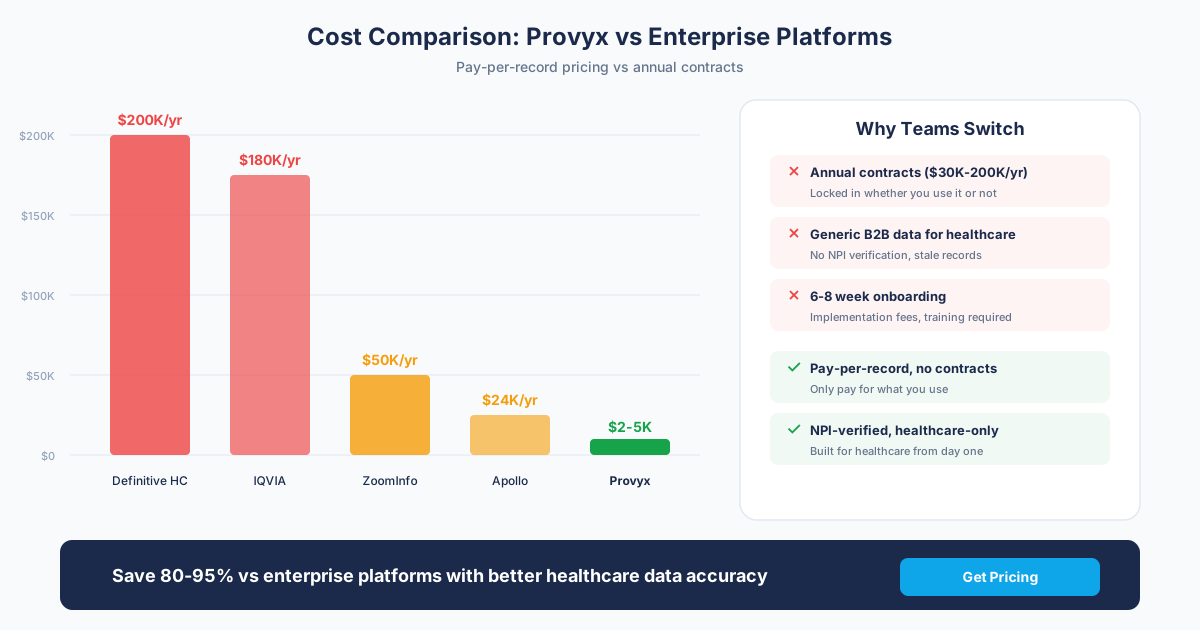
Provyx doesn't pretend to be the right choice for everyone. If you need intent data, website visitor tracking, or org charts for non-healthcare companies, you'll need a different tool. However, for the specific job of sourcing accurate healthcare provider business data at a predictable cost, the project-based model eliminates the overhead and risk that come with enterprise platform contracts. Source: current Provyx scope and pricing.
✓ Strengths
- Records checked against the CMS NPI Registry
- provider specialties and subspecialties for specialty filtering
- Practice-level data including direct phone, fax, address
- CSV or Excel flat-file delivery
- Built exclusively for healthcare provider intelligence
✗ Honest Limitations
- US healthcare providers only; no international coverage
- No intent data, website visitor tracking, or technographics
- No built-in email sequencer or sales engagement tools
- Not suitable if you prospect outside the healthcare vertical
Stage-Specific Customer Fit
General B2B Teams
Healthcare-Focused Teams
If you need healthcare-specific provider contact intelligence: Provyx is built for this exact use case. You'll get NPI-verified records, specialty classification filtering, practice-level location data, and pricing that doesn't require you to pay for 50 industries you don't sell into. If every dollar in your pipeline comes from healthcare organizations or individual providers, Provyx gives you a documented verification standard at handoff and a clear cost per delivered record. The onboarding is also simpler because there's no complex platform to learn. You tell Provyx what kind of providers you need, and you get a deliverable dataset back. Source: CMS NPPES files.
Enterprise Teams
Our Recommendation
The Bottom Line
The smart play:
- Multi-vertical teams: Keep ZoomInfo for non-healthcare verticals and supplement with Provyx for provider-specific campaigns.
Questions to Ask Before Signing
- Can I filter by specialty classifications?: If the answer is no, you'll be doing manual specialty research on the records.
- Are records NPI-verified?: If not, ask how they confirm a contact is an active, licensed healthcare provider.
- What practice-level data is included?: Practice address, phone, fax, owner name, and website matter more than corporate HQ data.
- Can I export data without per-seat restrictions?: Your team shouldn't need individual licenses to access records you've paid for.
How should the ZoomInfo comparison be handed to operations?
Keep three clear review outcomes for each relevant disputed field: accepted, rejected, and unresolved. Do not force an uncertain match into either of the first two groups. Accepted values can move into the destination workflow, rejected values can be excluded, and unresolved values can enter a review queue with the conflicting sources preserved. The same labels should be used for ZoomInfo and Provyx so the comparison reflects evidence rather than different grading rules.
For ZoomInfo, finish with a repeatable refresh plan. Save the source date, the check method, and the reason each volatile field matters to the campaign. Recheck the fields that can change before the next outreach cycle, then compare the new sample with the baseline. If the failure pattern changes, update the acceptance rule and document why. Keep the rejected and unresolved rows too, because they reveal whether the same identity, location, or contact problem returns. Review that evidence with the workflow owner before changing a global rule. A local exception should remain local unless the broader sample supports the change. That feedback loop makes the selection useful after procurement and gives the team a defensible way to reassess the decision later.
What belongs in the compare provyx vs zoominfo evaluation record?
The compare provyx vs zoominfo evaluation record should begin with the job the data will perform. Name the audience, destination workflow, fields used by that workflow, and the source that resolves conflicting values. Keep provider identity separate from practice identity, and keep both separate from the parent organization. That structure lets the review team see whether a failure belongs to the person, the location, the relationship, or the contact channel.
Define the acceptance rule before reviewing a sample
Keep disagreements visible
Test the operating handoff
Preserve a baseline for the next review
Design the comparison around provider identity
Choose a sample that reflects the campaign rather than the easiest records to find. Include independent clinicians, group practices, hospital-employed providers, shared locations, and ambiguous names from the specialties and regions the team will target. Resolve the provider first, then score current practice, organization relationship, business email, and phone as separate fields.
Keep title-based discovery separate from registry-keyed matching. A professional title can help find a candidate, while a durable provider identifier and current practice evidence determine whether the candidate belongs in the file. Record which step accepted each field and which source resolved a conflict.
Compare workflow effort as well as returned fields
Run the sample through the actual destination. Inspect saved-search logic, exports, field mapping, duplicate behavior, suppression rules, and corrections. Measure the analyst work needed to turn the returned records into an approved campaign file. A broad platform and a scoped list service can both return contacts while creating very different operating work.
Finish with an exception review. Group wrong-provider matches, old affiliations, headquarters addresses, shared business numbers, and uncertain email results. The pattern of exceptions tells the team more than a single aggregate score and gives the eventual owner a concrete process for future updates.
Test company intelligence and clinician identity separately
Begin with accounts that expose the difference: a clinician working across locations, a practice owned by a larger group, a health-system office with a local brand, and an independent clinic whose business name differs from the provider name. Ask each workflow to represent the person, local practice, and parent organization without collapsing them.
Score company attributes apart from healthcare identity evidence. Headcount, department, and corporate domain may help account selection, while provider identifiers, specialty, licensure source, and current care site support clinician resolution. A combined total can hide strong company coverage paired with an uncertain local relationship.
Rehearse the research and enrichment paths
Give researchers a frozen list of difficult records and observe how they find, accept, reject, and correct candidate contacts. Then run a separate enrichment sample through a disposable destination. Inspect overwrite rules, duplicate creation, field provenance, suppression handling, and what happens when the incoming value is blank or older than the CRM value.
Document the ongoing work after selection. Name the owner for source conflicts, departed employees, practice moves, shared domains, and bounced addresses. Estimate effort from the sampled exceptions rather than from a demonstration of the easiest records.
Preserve evidence for a later refresh
Store the input, vendor output, accepted mappings, rejected candidates, and decision notes together. At the next review, reuse the same definitions and draw a comparable sample. That history shows whether a workflow is becoming easier to operate without pretending that changing source data is static.
Frequently Asked Questions
Which records belong in a healthcare data trial?
Use clinicians, independent practices, institutional accounts, multi-location groups, and ambiguous affiliations from the campaign population. Include missing and conflicting records instead of selecting only easy examples.
How should company and provider identity be scored?
Score the company, individual provider, current care site, specialty, and parent relationship separately. A correct corporate record does not establish that the clinician works at the displayed office.
What should the CRM rehearsal inspect?
Inspect field mapping, precedence, blank values, duplicates, owner assignment, suppression state, source retention, and correction handling in a disposable workspace.
How should contact channels be labeled?
Distinguish direct business numbers, main office lines, scheduling channels, departmental inboxes, and named mailboxes. Preserve the source and check date for the accepted channel.
What belongs in the final decision record?
Save the tested input, field definitions, accepted mappings, rejected candidates, unresolved risks, user feedback, and owners for post-selection corrections.
Get the Provider Data You Need
Tell us what you're looking for. We'll build a custom list matched to your target market.
Trusted by healthcare sales teams, medical device companies, and health IT vendors across the US.
Review account construction with sales operations
Give the operations team the raw sample and the proposed account hierarchy. Ask them to trace a clinician from source evidence to practice, parent organization, owner, and territory. Record where they would split, merge, or leave relationships unresolved.
Inspect contactability without hiding channel type. A main office number, central scheduling line, direct business number, departmental inbox, and named mailbox support different actions. Keep the channel label and source date in the destination rather than presenting them as interchangeable values.
Test change handling with known examples
Add records with a recent practice move, renamed group, departed employee, acquired clinic, and corrected email. Observe whether the incoming workflow updates the intended field, creates a duplicate, or overwrites stronger first-party evidence. The result should show both the automatic behavior and the manual correction path.
Invite representatives who work metro, regional, and institutional territories to review the rows they would receive. Their feedback should focus on assignment clarity, current relationships, useful contact paths, and explainable uncertainty. Preserve disagreements in the decision record rather than forcing consensus into a single score.
Finally, inspect how account notes, source evidence, and rejected candidates survive export. A field that cannot be explained after the handoff creates recurring research work even when the first import appears clean. Ask the CRM owner to test one correction from source evidence through the destination, then confirm that the older value remains traceable. Add this correction path to the scorecard so ongoing stewardship receives the same scrutiny as initial discovery. Include a departed contact, a changed practice address, and a disputed parent organization in that test. Each case should show the source observation, destination behavior, reviewer decision, and resulting account assignment.