
ZoomInfo Alternative for Healthcare Provider Data
Updated April 2026
Why Sales Teams Look for a ZoomInfo Alternative in Healthcare

ZoomInfo
Contract contractual Risk
The problems start when your team only sells into healthcare.
No NPI verification or specialty classification. ZoomInfo identifies contacts by company, title, and industry code. It doesn't cross-reference the National Plan and Provider Enumeration System (NPPES) to verify that a contact is a licensed healthcare provider with a valid NPI number. It doesn't attach specialty classifications that tell you whether a physician is a family medicine practitioner, an interventional cardiologist, or a pediatric neurologist. For healthcare sales, that distinction isn't optional. A medical device rep selling spinal implants can't work from a list that lumps all physicians together. Without specialty classifications, your ops team has to manually research each contact's specialty, which turns a data problem into a labor problem.
Practice-level data gaps. ZoomInfo is built around companies and contacts. Healthcare operates around practices, clinics, and provider groups. You might find a physician's name and a hospital affiliation; however, you won't reliably get the practice's direct phone line, the office address where they see patients, or the practice owner's name. That gap creates friction for reps who need to reach decision-makers at independent or small group practices, which still represent a significant share of the healthcare workforce. When a rep dials the main hospital switchboard trying to reach a dermatologist who sees patients at a separate office three miles away; this is a data gap costing the rep time and costing you pipeline velocity.
✓ Reasons to Switch
- Get NPI-verified records instead of generic B2B contacts
- Filter by provider specialties and subspecialties for specialty targeting
- Practice-level data ZoomInfo doesn't provide
What Do Healthcare Sales Teams Need from Provider Data?
Selling to healthcare providers is different from selling to software companies or retail chains. The data requirements reflect that difference.
Specialty classification for precise segmentation. The specialty classification system behind NPI records covers more than 800 specialties and sub-specialties. A specialty classification identifies a physician who practices orthopedic surgery, or more specifically, orthopedic surgery of the spine. If you sell a product that's relevant to 3 specialties out of 800, specialty filtering is the difference between a targeted list and a spray-and-pray campaign. Source: CMS NPPES files.
Practice-level records, beyond employer records. A cardiologist might be affiliated with a hospital system but see patients at a private practice three days a week. The practice address, phone number, fax, and office manager matter more to a sales rep than the hospital system's corporate headquarters. Generic B2B databases tend to map providers to their largest known affiliation rather than the practice location where they see patients.
Owner and decision-maker identification. In small and mid-size practices, the physician owner is the buyer. There's no VP of Procurement to route through. Knowing who owns the practice, and being able to reach them directly, compresses the sales cycle. Generic databases rarely surface ownership information for medical practices because their data models aren't designed for it.
Specialty-aware geographic filtering. Healthcare markets are local. A rep covering Houston needs providers in Houston, and a national list filtered by state leaves that rep scrolling. The ability to filter by specialty, sub-specialty, and geography simultaneously, down to the ZIP code or metro level, is how teams build territory-aligned prospect lists that reps can work. Generic databases offer geographic filtering; however, combining it with healthcare-specific specialty classifications is where most of them fall short.
These aren't nice-to-have features. These are the baseline for any team running outbound sales or marketing campaigns into the healthcare provider market.
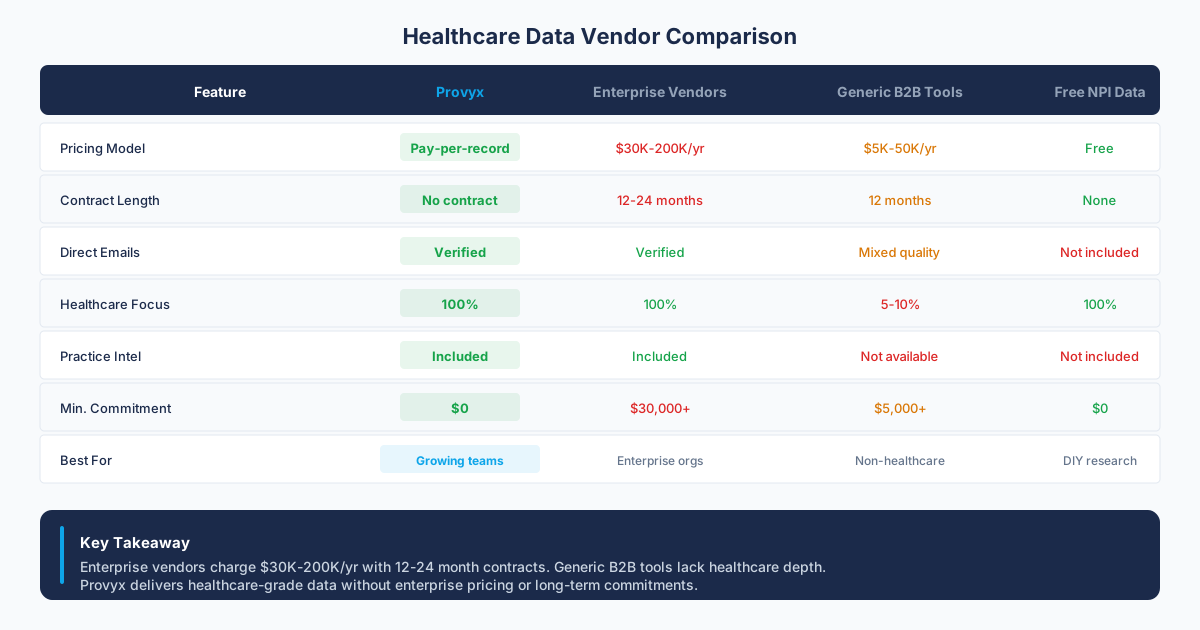
ZoomInfo vs. Provyx: Quick Comparison
| Factor | ZoomInfo | Provyx |
|---|---|---|
| Starting Price | Confirm in current vendor documentation or a written quote | Verify the measured value and observation date before use. |
| Contract Terms | Confirm in current vendor documentation or a written quote | |
| Healthcare Specialties | General industry tags No classification | specialty and subspecialty coverage classification |
| NPI Verification | Not included No NPI | Every record NPI-Verified |
| specialty classifications | Not available Missing | Included On All Records |
| Practice Data | Company-level Limited | Practice-level Full Detail |
| Data Delivery | Platform, CRM, API Integrated | CSV or Excel Flexible |
| Best For | Multi-industry B2B sales teams | Teams selling exclusively to healthcare providers |
How Provyx Works as a ZoomInfo Alternative for Healthcare
Provyx is a healthcare provider business data platform. It doesn't try to cover many industries. It covers one vertical deeply and does it well, combining public registry data with commercial data sources to build verified, practice-level provider records that sales teams can act on immediately.
Where the Data Comes From
Provyx sources its provider contact intelligence from three categories of data:
- Public NPI registries: The NPPES database, maintained by CMS, is the authoritative source for provider identification. Provyx ingests the full NPI registry and uses it as the foundation for the records. This gives you verified NPI numbers, specialty classifications, enumeration dates, and practice addresses as reported to CMS.
- Business listings and public filings: State licensing boards, secretary of state filings, business directories, and public web data fill in practice details that the NPI registry doesn't include: direct phone numbers, websites, office hours, and ownership information.
- Commercial databases: Third-party data providers contribute firmographic details, technology stack information, and contact enrichment. This layer adds LinkedIn profile URLs, estimated practice revenue ranges, and staff size indicators where available.
The reviewed records pass through a matching process that links the NPI to the enriched practice profile. Records that can't be confidently matched are flagged rather than delivered.
NPI Verification Process
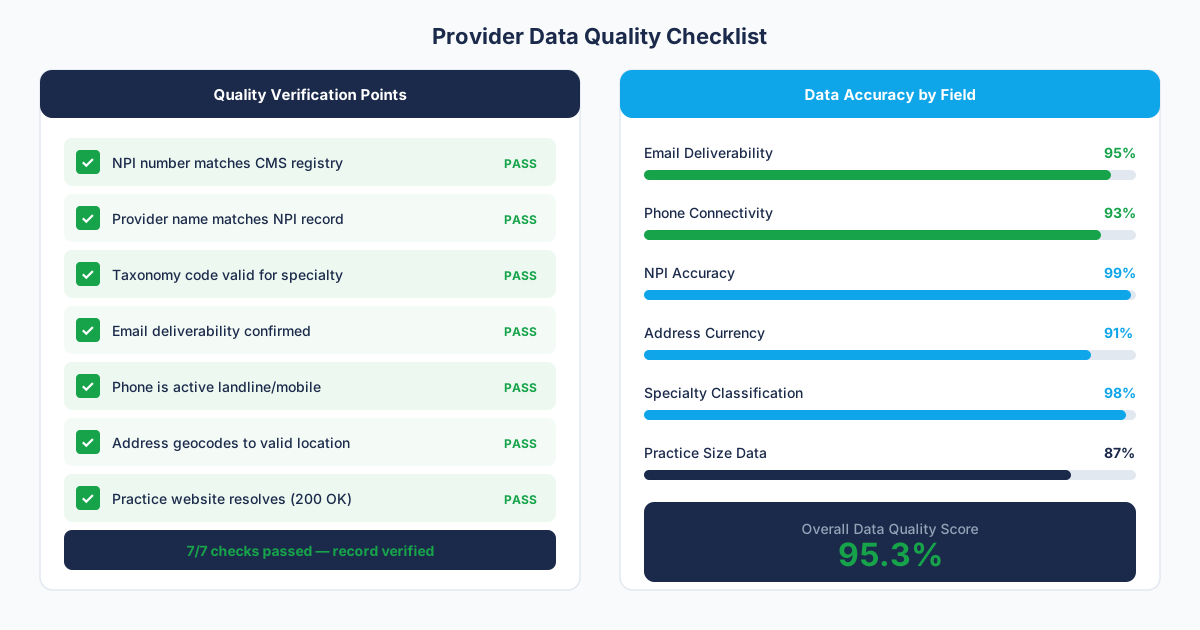
When Provyx delivers a provider record, the NPI on that record has been verified against the current NPPES data. That means the NPI is active (not deactivated), it matches the provider's name, and the associated specialty classification reflects their current reported specialty. This sounds simple; however, it eliminates a common problem: stale records where a provider has retired, moved, or changed specialties. ZoomInfo's records don't go through this step because NPI data isn't part of their data model.
What's in Each Record
A standard Provyx provider record includes:
- Provider full name (individual or organization)
- NPI number (Type 1 for individuals, Type 2 for organizations) Source: CMS NPPES files.
- Primary and secondary specialty classifications with plain-language specialty labels
- Practice name and doing-business-as name
- Practice mailing address and practice location address
- Phone number and fax number
- Practice website URL
- Practice owner name (where available from public records)
- LinkedIn profile URL (where matched with high confidence)
- Enumeration date (when the NPI was first assigned)
Not every field is populated on every record. Coverage rates vary by field: NPI and classification are at 100% by definition, phone numbers are above 85%, websites are around 70%, and LinkedIn matches are closer to 55%. Provyx publishes its field-level coverage rates so you know what to expect before you buy. Source: current Provyx scope and pricing.
Delivery Formats
You can get your data three ways:
- CSV download: Flat file, ready for import into any CRM or spreadsheet. Most customers choose CSV.
- Excel download: Formatted workbook with column headers and basic filtering. Useful for handing directly to reps.
Pricing Model
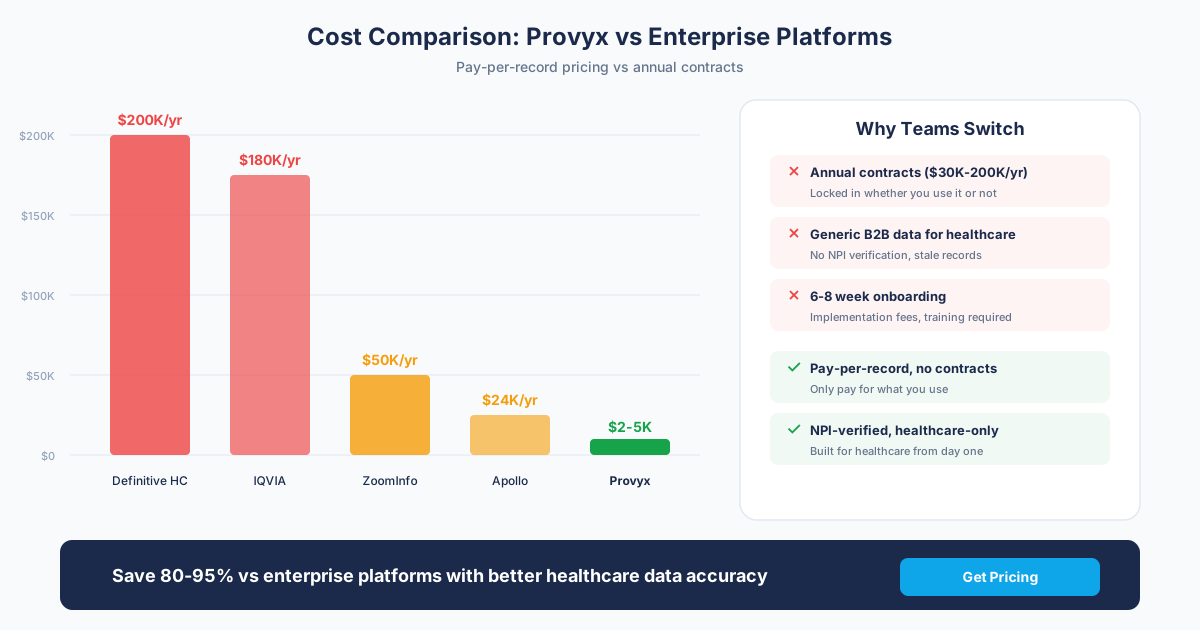
Provyx uses project-based pricing starting at $2,500. You define the specialty, geography, and filters you need, and you pay for the contacts that match, each with a validated email. There's no annual contract. There's no seat license. The per-contact price drops at volume. You won't get a surprise renewal invoice 12 months later because there's nothing to renew unless you choose to reorder. Source: current Provyx scope and pricing.
Provyx Scope Boundaries
Provyx covers healthcare and nothing else. If your company sells to healthcare providers and to financial services firms and tech startups, you'll still need a general B2B database for those other verticals.
It also doesn't provide buyer intent signals, website visitor identification, or technographic data outside of healthcare practices. If those capabilities drive your current workflow in ZoomInfo, you'd lose them by switching. For teams where the primary value was always the healthcare contact data, those features were extras they never adopted.
Documenting a tool's limits keeps the evaluation focused on the workflow it can support.
Who Switches from ZoomInfo to Provyx
Medical Device Sales Teams
Healthcare Marketing Agencies
Health IT Companies
Companies selling EHR systems, practice management software, or telehealth platforms to physician practices need to know what technology a practice currently uses. Provyx's commercial data layer includes technology detection signals for practice websites, so health IT sales teams can filter by current EHR vendor, online scheduling presence, or patient portal adoption. That kind of technographic filtering on healthcare practices specifically isn't something ZoomInfo exposes at the practice level. A health IT company targeting practices still running legacy PM software can build that list in Provyx without manually auditing practice websites one by one.
Pharma Commercial Teams
How to Switch from ZoomInfo to Provyx
Switching data providers doesn't have to be a six-month project. Here's a practical path.
Step 2: Run a side-by-side test. Give your reps both lists for the same territory. Track connect rates, bounce rates on addresses, and time-to-qualification. Provider data quality shows up fast in outbound metrics. If reps connect with more decision-makers per dial, the data is working.
Step 3: Start with a single list purchase. Don't commit to a full migration on day one. Buy one list for one team or one territory. Import it into your CRM alongside your existing data. Let your reps use it for two to four weeks and collect feedback.
Most teams complete the evaluation in two to three weeks. The ones that plan around their ZoomInfo renewal date avoid getting locked into another year. Source: ZoomInfo product documentation.
Our Recommendation
The Bottom Line
- Step 1: Order a Provyx list for your target specialty and geography.
Questions to Ask Before Signing
- Keep measured values only when the source, scope, and observation date travel with the record.
What belongs in the alternatives zoominfo alternative evaluation record?
The alternatives zoominfo alternative evaluation record should begin with the job the data will perform. Name the audience, destination workflow, fields used by that workflow, and the source that resolves conflicting values. Keep provider identity separate from practice identity, and keep both separate from the parent organization. That structure lets the review team see whether a failure belongs to the person, the location, the relationship, or the contact channel.
Define the acceptance rule before reviewing a sample
Keep disagreements visible
Test the operating handoff
Preserve a baseline for the next review
Inventory the workflow before replacing the data source
List the searches, enrichment jobs, exports, integrations, sequences, permissions, and reports the current platform supports. Mark which functions the team uses and which merely appear in the subscription. A replacement plan should preserve the needed operating steps and explicitly retire the rest.
Use a healthcare sample with known providers, current practices, shared locations, and difficult specialties. Score identity, clinical classification, organization relationship, business email, phone, and unresolved records separately. Keep the source and observation date beside each manual decision.
Rehearse the migration in a disposable workspace
Test field mapping, duplicate rules, update precedence, suppression behavior, and correction handling before changing the production workflow. Compare the work needed to create an approved campaign file, not only the number of returned records.
Document the handoff owner and exception route. If one tool supplies engagement features and another supplies a scoped provider file, state where each system begins and ends. That boundary prevents stale values from circulating between tools without a clear source of truth.
Inventory the current workflow before considering replacements
List the jobs people perform today: market selection, account research, contact discovery, enrichment, sequencing, calling, routing, and reporting. Record the saved searches, field mappings, integrations, permissions, and exception queues attached to those jobs. A replacement that covers contact discovery may still leave company research or engagement operations without an owner.
Rank the jobs by operational consequence. A field that assigns the wrong territory or attaches a clinician to the wrong practice deserves more scrutiny than a field used only for optional personalization. Define what evidence is acceptable for each important value and how old an observation can be before it returns to review.
Compare categories with representative records
Use difficult healthcare examples as well as clean ones. Include individual clinicians, small practices, institutional accounts, multi-location groups, parent organizations, and records with shared domains. Score identity, specialty, current practice, corporate relationship, business contact channels, and unresolved outcomes separately.
Test research, bulk enrichment, and CRM delivery as distinct workflows. Observe the steps a user takes, the fields that overwrite existing data, duplicate handling, permissions, suppression behavior, and correction flow. Keep missing and ambiguous records in the results; removing them makes the trial look easier than production.
Plan a reversible transition
Run the candidate in a disposable workspace with a copy of the mapping. Keep the existing process unchanged until the sample passes and operators accept the exception path. If several tools replace one platform, identify the durable key and handoff rules that keep their records aligned.
Finish with a decision record that names retained capabilities, retired capabilities, new owners, unresolved risks, and a review date. Store the sample and rejected rows with it so later reviewers can reproduce the reasoning.
Frequently Asked Questions
How current is the data in Provyx?
Provyx refreshes its core NPI registry data in sync with the NPPES weekly update cycle. Practice details sourced from business listings and commercial databases are updated on a rolling basis, with most records refreshed within a 90-day window. When you purchase a list, you're getting data from the most recent available refresh. Delivered records include the available verification date. Source: CMS NPPES files.
How should a team test a healthcare-focused alternative?
Use the same provider sample, field definitions, source dates, and destination workflow. Score identity, specialty, practice location, business contact fields, and unresolved records separately. Source: https://www.zoominfo.com/products/sales.
Which ZoomInfo workflow dependencies should be inventoried?
List saved searches, enrichment jobs, exports, integrations, sequences, permissions, and downstream field mappings. The replacement decision should account for operations as well as data. Source: https://www.zoominfo.com/products/sales.
What belongs in a migration rehearsal?
Run a disposable import, inspect duplicate handling and field precedence, test corrections, and save the mapping. Keep the existing workflow unchanged until the sample passes its acceptance rules. Source: https://www.zoominfo.com/products/sales.
How should a migration decision be documented?
Save the tested population, accepted field definitions, source dates, rejected rows, destination mapping, user feedback, and unresolved risks. That record makes later review possible without reconstructing the trial.
Ready to See How Provyx Compares to ZoomInfo?
Get provider data for your specialty and geography. Compare it side-by-side with what you're getting from ZoomInfo today.
Trusted by healthcare sales teams, medical device companies, and health IT vendors across the US.
Decide how several sources will coexist
A narrower replacement may need company intelligence, provider identity, business contacts, and engagement data from different sources. Choose a durable entity key and define which system owns each field. Document precedence by field rather than allowing the latest import to overwrite values indiscriminately.
Design an exception queue for disputed employers, parent organizations, practice sites, and contact channels. The queue should retain candidate values, source dates, and the reason a value was rejected or deferred. Assign ownership before migration so uncertainty does not disappear inside a completed record.
Validate the reporting transition
List dashboards and routing rules that depend on current fields. Rebuild them against the test workspace and compare account assignment, segment membership, and activity attribution. Differences should be traced to a definition or mapping decision, then accepted or corrected explicitly.
Train operators with the same difficult records used in the evaluation. Their questions will expose missing field definitions and correction paths before production use. Add the answers to the operating guide and preserve the training sample as a regression set.
Review the first working batch against that set. Confirm that accepted relationships, unresolved candidates, field precedence, and territory assignments behave as documented. Keep the migration reversible until the operators who own corrections can reproduce the process without the evaluation team. Before retiring the existing path, reconcile a working campaign against the preserved sample. Review account creation, contact ownership, segment filters, suppression flags, and correction notes. Record any capability that remains temporarily split across systems and name the person responsible for closing that gap. Schedule a review after operators have handled real exceptions, and compare those cases with the assumptions recorded during selection. Update field rules only when the evidence supports a broader change; keep one-off corrections attached to their records.