
Healthcare Provider Data API: Integration Guide for Teams
Your provider data is only as useful as your ability to get it into the systems where your team works. Here's how to do that without burning engineering cycles.
2026-04-02
The Real Cost of Manual Provider Data Management
Here's a number that should make you uncomfortable: sales operations teams at healthcare B2B companies spend an average of 12-15 hours per week managing provider data manually. Downloading files, reformatting columns, deduplicating records, uploading to the CRM, fixing field mapping errors, then doing it all again next month.
At a $75/hour fully-loaded cost for a sales ops analyst, that's $46,800-$58,500 per year in labor. For a single person doing data management. Most teams have 2-3 people touching provider data workflows. You're looking at $100,000-$175,000 annually in manual data handling before you even count the cost of the data itself.
Programmatic access to provider data through APIs and automated pipelines eliminates most of this cost. But the path from "we manage data in spreadsheets" to "our CRM updates itself" isn't straightforward. There are real architectural decisions, trade-offs, and gotchas along the way.
This guide covers the technical and strategic considerations for integrating healthcare provider data into your systems. Whether you're evaluating API vendors, building an ETL pipeline, or trying to figure out if you should build or buy, this is the breakdown you need.
API vs. Bulk File Delivery: When to Use Each
The first decision is how you want to receive provider data. There are two primary models, and most mature organizations use both for different purposes.
Bulk File Delivery
You receive a complete dataset on a scheduled basis. Typically a CSV or JSON file delivered via SFTP, S3 bucket, or direct download. Monthly or quarterly delivery is standard.
Best for:
- Initial CRM population (loading your first set of provider records)
- Large-scale territory planning and segmentation
- Data warehouse loads for analytics and reporting
- Teams without engineering resources for API integration
- One-time or infrequent data purchases
Limitations:
- Data starts aging immediately after delivery
- Requires manual or semi-automated loading processes
- No real-time verification capability
- Duplicate management across successive file loads gets messy
Bulk delivery is the right starting point for most teams. It's simpler, requires less technical setup, and gives you a complete dataset to work with. If your team is under 20 sales reps and your data needs are focused on a specific geography or specialty, bulk files may be all you ever need.
API Access
You query a provider data API in real-time to retrieve, verify, or enrich records programmatically. The API returns individual records or small batches in response to specific queries (by NPI, name, specialty, geography, etc.).
Best for:
- Real-time data verification at the point of use
- CRM enrichment workflows (auto-populate new records as they're created)
- Lead scoring models that need fresh data inputs
- Applications that serve provider data to end users
- High-frequency data needs (daily or real-time updates)
Limitations:
- Requires engineering resources to build and maintain integrations
- Rate limits and API costs scale with usage
- Network dependency (if the API is down, your workflow stalls)
- Not practical for loading 100,000+ records at once
API access makes sense when you need data freshness, automation, or integration into custom applications. If your sales team operates in Salesforce and you want every new lead automatically enriched with provider data, you need an API.
The Hybrid Approach
Most sophisticated teams use both. Bulk file delivery for the initial load and periodic full refreshes. API for real-time verification and incremental enrichment. This gives you the breadth of bulk data with the freshness of API access.
Example workflow:
- Quarterly bulk file loads 50,000 provider records into your data warehouse
- ETL pipeline transforms and loads records into Salesforce
- When a rep opens a record, a real-time API call verifies the contact data
- If any fields have changed (new phone, new address), the CRM record updates automatically
- Monthly delta file adds new providers and removes deactivated NPIs
CRM Integration Patterns
The CRM is where your sales team lives. If provider data doesn't make it into the CRM cleanly, it doesn't matter how good the data is. Here's how to structure the integration for Salesforce and HubSpot, the two most common CRMs in healthcare B2B.
Salesforce Integration
Salesforce offers multiple paths for provider data integration:
Data Loader (manual/semi-automated): Salesforce's native Data Loader tool handles CSV imports up to 5 million records. Suitable for initial loads and periodic bulk updates. Map provider data fields to Salesforce Account and Contact objects. Set up duplicate rules before loading to prevent record proliferation.
Salesforce Connect (near real-time): External data sources appear as virtual objects in Salesforce without importing the data. Provider records stay in your data warehouse and Salesforce queries them on demand. Good for large datasets where you don't want to consume Salesforce storage. Latency is higher than native records.
Custom API integration (real-time): Build an Apex trigger or Flow that calls the provider data API when specific events occur. New lead created? Auto-enrich with NPI data, specialty, practice details, and additional contacts at the same facility. This is the most powerful pattern but requires Salesforce development resources.
Middleware platforms (Workato, Tray.io, Zapier): No-code integration tools that connect your provider data API to Salesforce without custom development. Set up triggers (new Contact created, Account field changed) that fire API calls and map the response back to Salesforce fields. Lower engineering cost, but middleware adds a subscription fee ($10,000-$50,000/year for enterprise platforms).
HubSpot Integration
HubSpot's architecture is flatter than Salesforce, which simplifies some data mapping but creates challenges with complex provider relationships.
Import tool (manual): HubSpot handles CSV imports for Companies and Contacts. Map NPI fields to custom properties. HubSpot's deduplication is based on email (Contacts) and domain (Companies), which creates issues for healthcare: many small practices share a domain or don't have individual provider emails.
Operations Hub (automated): HubSpot Operations Hub includes data quality automation, programmable automation (custom code in workflows), and data sync features. Use programmable automation to call a provider data API when a Contact is created and write enrichment data back to the record. Available at Operations Hub Professional ($800/month) or Enterprise ($2,000/month).
Custom integration via HubSpot API: HubSpot's API supports creating, updating, and associating Company and Contact records. Build a middleware service that reads from your provider data source and writes to HubSpot. Associate providers (Contacts) with practices (Companies) using HubSpot's association API. Rate limits are generous (100 requests per 10 seconds on most endpoints).
Field Mapping Best Practices
Regardless of CRM, follow these mapping principles:
- NPI as external ID.: Map the NPI number as an external identifier on both Account/Company and Contact records. This is your deduplication key for provider records. Never rely on name matching alone. "Dr. Robert Smith" and "Robert A. Smith, MD" are the same person but name matching will create duplicates.
- Separate practice address from mailing address.: NPI records contain both. The practice location address is where the provider sees patients. The mailing address is often a billing office or PO box. Your sales team needs the practice location. Map both but make practice address the primary display field.
- specialty classifications translation.: Raw specialty classifications (e.g., 207Q00000X) are meaningless to sales reps. Create a lookup table that translates specialty classifications to readable specialty names and map the readable name to the CRM. Store the raw code in a separate field for reporting.
- Multi-practice provider handling.: Approximately 15-20% of providers practice at multiple locations. Decide your strategy: create one Contact record with the primary location, or create Contact records for each location? For sales teams, one Contact per provider (at their primary location) with a notes field listing other locations is usually the right approach. It prevents duplicate outreach.
Building an ETL Pipeline for Provider Data
If you're working with bulk provider data files, you need an ETL (Extract, Transform, Load) pipeline to get that data into your systems cleanly and repeatably.
Extract
Pull raw provider data from your source. This might be:
- The CMS NPI weekly/monthly data dissemination files (free, 7GB+ compressed)
- Vendor-delivered CSV/JSON files via SFTP
- API batch downloads from your provider data vendor
For CMS NPI files specifically: they distribute a full replacement file monthly and weekly differential files for changes. The full file contains every NPI ever issued (active and deactivated). The differential file contains only records that changed in the past week. Use the differential files for ongoing updates and the full file for periodic reconciliation.
Automate extraction on a schedule. A simple cron job or cloud function that downloads the latest file, validates the checksum, and stages it for transformation.
Transform
This is where most of the complexity lives. Raw NPI data needs significant transformation before it's useful for sales.
Key transformations:
- specialty classifications resolution.: The NPI file contains up to 15 specialty classifications per provider. Identify the primary classification (marked with a flag) and translate to a readable specialty name.
- Address standardization.: USPS-standardize all addresses. This normalizes "123 Main St" vs "123 Main Street" and validates deliverability. Use a service like SmartyStreets or USPS Web Tools API ($0.01-$0.04 per address).
- Provider status filtering.: Remove deactivated NPIs. The deactivation date and reason are included in the file. Filter to active records only for your sales database.
- Practice aggregation.: Group individual providers (Type 1 NPIs) by practice location to create practice-level records. Count providers per location. This gives you practice size indicators.
- Contact enrichment.: If you're enriching NPI data with contact information from additional sources (emails, direct dials, LinkedIn), this is where you join those datasets. Match on NPI number when possible. Fall back to name + address matching with fuzzy logic when NPI isn't available in the enrichment source.
- Deduplication.: Both within the file and against existing records in your target system. NPI is the primary dedup key. For records without NPI matches, use name + address + specialty as a composite key.
For a deeper look at data quality in provider databases, see our guide on healthcare provider database accuracy.
Load
Write the transformed data to your target systems. Common targets:
- Data warehouse (Snowflake, BigQuery, Redshift):: Full dataset for analytics and reporting. Use incremental loads (upsert on NPI) rather than full replacements to preserve historical data and reduce load times.
- CRM (Salesforce, HubSpot):: Filtered and enriched records for sales use. Use bulk APIs for initial loads (Salesforce Bulk API 2.0 handles up to 150MB per job). Use standard APIs for incremental updates.
- Custom applications:: If you serve provider data to end users through your own product, load into your application database (PostgreSQL, MySQL, etc.) with appropriate indexing on NPI, specialty, and geography fields.
Pipeline Technology Choices
For teams building their first provider data pipeline:
- Simple (low volume, small team):: Python scripts using pandas for transformation. Schedule with cron or GitHub Actions. Store in PostgreSQL. Total infrastructure cost: nearly zero if running on an existing server.
- Mid-scale (10K-1M records, regular updates):: Apache Airflow or Dagster for orchestration. Dbt for transformation logic. Load to Snowflake or BigQuery. Infrastructure cost: $200-$500/month.
- Enterprise (1M+ records, real-time needs):: Managed ETL service (Fivetran, Airbyte) for extraction. Dbt for transformation. Snowflake for storage. Reverse ETL (Census, Hightouch) for CRM sync. Infrastructure cost: $1,000-$5,000/month depending on volume.
Real-Time Verification Endpoints
One of the highest-value uses of a provider data API is real-time verification. When a sales rep pulls up a provider record, verify that the data is still current before they pick up the phone.
What Real-Time Verification Checks
- NPI status:: Is this NPI still active? CMS deactivates roughly 50,000 NPIs per year. If your rep calls a provider whose NPI was deactivated 3 months ago, they've either retired, moved, or had their license revoked. Any of those makes them a dead lead.
- Address currency:: Is the provider still at this address? Cross-reference against the latest NPI file and any additional sources (state licensing boards, practice websites).
- Phone number validation:: Is this number still in service? Is it a fax line? Mobile or landline? A 10-second API call can save your rep 5 minutes of calling a disconnected number and searching for the right one.
- Email deliverability:: Will this email address accept messages? Check for hard bounces, full mailboxes, and catch-all domains without sending a test email.
Integration Architecture for Verification
The cleanest pattern for real-time verification in a CRM:
- Rep opens a Contact or Account record in the CRM
- A lightweight script (Salesforce Flow, HubSpot workflow, or browser extension) fires on record open
- Script calls the verification API with the NPI or contact details
- API returns verification status and any updated fields
- Script updates the CRM record and shows the rep a "Verified" or "Needs Review" badge
- If data has changed, the script logs the change for reporting
Response time matters here. If verification takes more than 2-3 seconds, reps will click away before it completes. Look for APIs with sub-second response times on single-record queries.
Data Refresh Strategies
Provider data isn't static. CMS data shows 4-6% of provider records change every month. Phone numbers disconnect. Providers move practices. New providers enter the market. Your data integration needs a refresh strategy.
Full Replacement
Download the complete dataset and replace your existing records. Simple but wasteful for large datasets. A full NPI file is 7GB+ compressed. Processing and loading the entire file monthly is expensive in compute time and can create data availability gaps during the load.
Use full replacement for: annual reconciliation, initial setup, or when your data pipeline needs a clean slate.
Differential Updates
Process only records that changed since the last update. CMS provides weekly differential NPI files. Commercial vendors can provide delta files or changelog APIs that return only modified records.
Differential updates are more efficient but require careful change tracking. You need to handle:
- New records (insert)
- Modified records (update specific fields)
- Deactivated records (flag or remove)
- Reactivated records (unflag)
Event-Driven Updates (Webhooks)
The most advanced pattern. Your data vendor pushes changes to your system as they occur, rather than you pulling on a schedule. A webhook fires when a provider record changes, delivering the updated record to your endpoint in near real-time.
Webhook-based updates are ideal for teams that need data freshness measured in hours rather than days. They require a publicly accessible endpoint on your side to receive the webhook payload, plus logic to process and apply the update.
Not all vendors offer webhooks. If yours doesn't, you can approximate the pattern by polling the API for changes at frequent intervals (hourly or every few hours).
Build vs. Buy: The Decision Framework
Should you build your own provider data pipeline from public sources, or buy from a vendor? This is the question every data-savvy healthcare B2B team asks eventually. Here's the honest analysis.
Building from Public Sources
The NPI registry, CMS data files, state licensing boards, and NPPES API are all free and publicly available. A competent data engineer can build a pipeline that downloads, processes, and loads NPI data in 2-3 weeks.
Total cost to build and maintain:
- Initial build: 80-120 engineering hours ($12,000-$24,000 at $150-$200/hour)
- Monthly maintenance: 10-15 hours ($1,500-$3,000/month)
- Infrastructure: $200-$500/month for compute and storage
- Annual total: $25,000-$60,000
What you get: NPI data (name, classification, address, phone). That's it. No emails, no direct dials, no decision-maker names, no ownership data, no practice size indicators. The public NPI registry gives you the skeleton. You're missing the muscle and the skin.
To get contact-level enrichment from public sources, you need to build or buy additional capabilities: email finding tools ($500-$2,000/month), phone verification services ($0.01-$0.05 per check), web scraping infrastructure (significant engineering effort), and LinkedIn scraping (which violates LinkedIn's terms of service). Add another $30,000-$80,000/year in tools and engineering time.
Realistic total cost to build a complete pipeline: $55,000-$140,000/year.
Buying from a Vendor
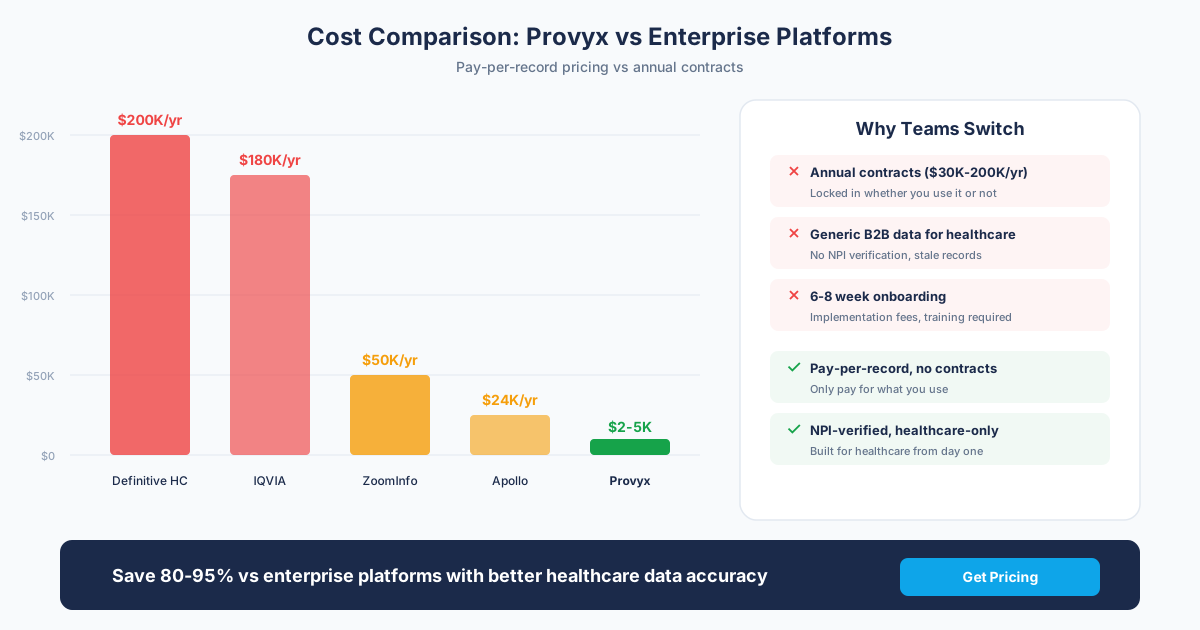
A healthcare-specific data vendor delivers enriched provider records ready for CRM loading. Pricing models vary:
- Per-record pricing:: $0.15-$1.50 per provider record, depending on enrichment depth. Basic NPI data is at the low end. Full contact data with emails, direct dials, and decision-maker names is at the high end.
- Subscription pricing:: $500-$5,000/month for ongoing access to a dataset with regular refreshes. Typically includes API access and a set number of records or lookups per month.
- Enterprise licensing:: $20,000-$100,000+/year for full database access with unlimited queries, API access, and custom integrations.
What you get: Enriched records with contact data, delivered in your preferred format, with ongoing refreshes. No engineering time spent on data collection, only on integration.
When to Build
- You have strong data engineering talent already on payroll
- You only need basic NPI data (no contact enrichment)
- Your use case requires custom data transformations no vendor supports
- You're building a data product where provider data is core to your business
When to Buy
- You need contact-level enrichment (emails, direct dials, decision-maker names)
- Your engineering team's time is better spent on your core product
- You need data faster than you can build a pipeline
- Data accuracy matters more than data cost (vendor QA catches errors you won't)
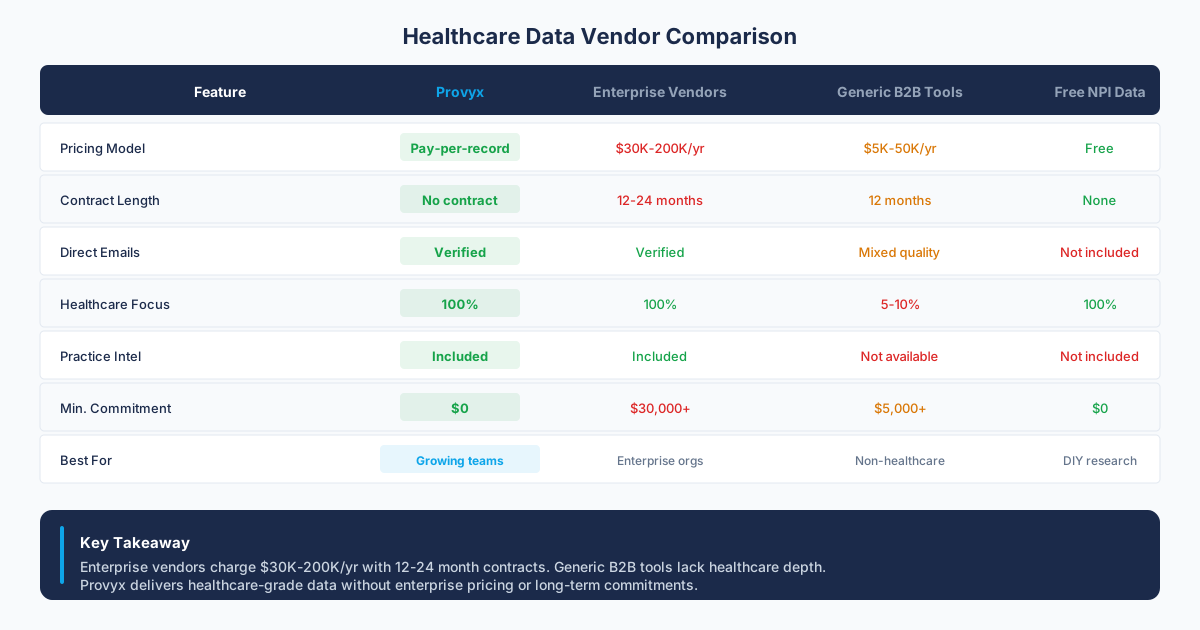
For most healthcare B2B sales teams, buying is the right call. The total cost of building and maintaining a complete provider data pipeline exceeds what you'd pay a vendor, and you get better data faster. The build route makes sense for companies where provider data is the core product (like a data enrichment service) or where you have very specific data requirements that no vendor can meet.
Cost Comparison: API vs. Manual Data Management
Let's put real numbers on the comparison between manual data management and API-integrated workflows.
Manual Workflow Costs (Annual)
- Data analyst time (file management, dedup, loading): $46,800-$58,500
- Sales rep time spent verifying data: $31,200-$62,400 (30-60 min/day per rep, 10 reps)
- Data vendor subscription: $12,000-$60,000
- Email verification tools: $1,200-$6,000
- CRM data cleanup tools: $3,000-$12,000
- Total: $94,200-$198,900/year
API-Integrated Workflow Costs (Annual)
- Data vendor subscription with API: $18,000-$80,000
- Integration build (one-time, amortized): $5,000-$15,000
- Integration maintenance: $6,000-$12,000
- Middleware platform: $6,000-$24,000
- Data analyst time (monitoring, exceptions): $15,600-$23,400
- Total: $50,600-$154,400/year
The API-integrated approach saves $30,000-$60,000 per year in direct costs. But the bigger savings are in sales productivity. When reps trust the data and don't spend 30-60 minutes per day verifying contacts, they make more calls, send more emails, and book more meetings. A 10-rep team reclaiming 30 minutes per day generates an additional 1,300+ hours of selling time annually.
Security and Compliance Considerations
Provider contact data isn't Protected Health Information (PHI), but it's still business-sensitive data that requires proper handling.
- Data storage encryption.: Encrypt provider data at rest in your systems. This is standard practice and most modern databases support it natively.
- API authentication.: Use API keys or OAuth 2.0 for all provider data API calls. Never embed credentials in client-side code or public repositories.
- Access controls.: Not every employee needs access to your full provider database. Implement role-based access in your CRM and data warehouse.
- State privacy laws.: California (CCPA), Virginia (CDPA), Colorado (CPA), and other states have data privacy provisions that can apply to B2B contact data. Ensure your data collection and usage practices comply. Your data vendor should provide a Data Processing Agreement (DPA) that covers these requirements.
- Vendor security assessment.: Before integrating with any provider data API, verify the vendor's security posture. SOC 2 compliance, penetration testing, and data encryption standards are table stakes for any vendor handling provider contact information.
For more on healthcare data compliance in CRM contexts, check our CRM data enrichment guide.
Getting Started
If you're moving from manual provider data management to API-integrated workflows, here's the path:
- Audit your current state.: How much time does your team spend on manual data management? What's your current data freshness and accuracy? These numbers justify the investment.
- Define your requirements.: What data fields do you need? What systems need to receive the data? What's your refresh frequency requirement?
- Evaluate vendors.: Get samples from 2-3 healthcare data providers. Test data accuracy against your own records. Ask about API documentation, rate limits, and SLAs.
- Start with bulk, add API.: Load a bulk file first. Get your CRM field mapping right. Then add API-based verification and enrichment as a second phase.
- Measure the impact.: Track rep time spent on data management, contact-to-conversation rates, and email bounce rates before and after integration. These metrics prove ROI and justify ongoing investment.
Provyx supports both bulk file delivery and API access for healthcare provider data. Whether you need a one-time list or an ongoing data feed into your CRM, talk to our team about the integration pattern that fits your stack.
Frequently Asked Questions
What's the difference between API access and bulk file delivery for provider data?
Bulk file delivery gives you a complete dataset (CSV or JSON) on a schedule, typically monthly or quarterly. It's best for initial CRM loads, analytics, and teams without engineering resources. API access lets you query individual records in real-time for verification, enrichment, and automated workflows. Most mature teams use both: bulk for baseline data and API for real-time freshness.
How do I integrate provider data into Salesforce?
Four options, from simplest to most powerful: (1) Data Loader for manual CSV imports, (2) Salesforce Connect for virtual external objects, (3) custom Apex/Flow integration that calls a provider data API on record events, (4) middleware platforms like Workato or Tray.io for no-code API integration. Use NPI as your external ID for deduplication. Map practice address separately from mailing address.
How often should provider data be refreshed in our CRM?
At minimum, monthly. CMS data shows 4-6% of provider records change each month. For high-volume sales teams, weekly differential updates are better. The best approach combines monthly bulk refreshes with real-time API verification when reps access individual records. This ensures baseline freshness while catching changes between bulk loads.
Should we build our own provider data pipeline or buy from a vendor?
Building from public NPI data costs $55,000-$140,000/year when you include engineering time, enrichment tools, and infrastructure. You get basic NPI data but no emails, direct dials, or decision-maker names. Buying from a vendor costs $18,000-$80,000/year with API access and delivers enriched records ready for CRM loading. Buy unless provider data is your core product or you have very specific needs no vendor can meet.
What is the CMS NPI API and can I use it for free?
CMS offers a free NPI Registry API (NPPES API) at https://npiregistry.cms.hhs.gov/api/. It returns provider name, classification, address, and phone for any NPI query. It's useful for single-record lookups and verification. Limitations: no contact enrichment (no emails or direct dials), rate limits on bulk queries, and the data is only as current as CMS's update cycle. It's a good verification layer but not a complete data solution for sales teams.
How do webhooks work for provider data updates?
Webhooks push data changes to your system in near real-time, rather than you pulling on a schedule. When a provider record changes (new address, deactivated NPI, updated phone), the vendor sends an HTTP POST to your endpoint with the updated record. You process the payload and apply the change to your CRM or database. This is the fastest refresh method but requires a publicly accessible endpoint and processing logic on your side.
Sources and References
Related Resources
Get the Provider Data You Need
Tell us what you're looking for. We'll build a custom list matched to your target market.
Trusted by healthcare sales teams, medical device companies, and health IT vendors across the US.