Provyx vs. Ribbon Health
Compare Ribbon Health and Provyx against the same use case, fields, evidence standard, and delivery workflow. Review the current Ribbon Health product documentation alongside the written Provyx scope before deciding.
Updated September 2026
Ribbon Health vs. Provyx at a Glance
| Factor | Ribbon Health | Provyx |
|---|---|---|
| Primary Use Case | Provider directories & care navigation Health Plans | Sales prospecting & outreach lists Sales Teams |
| Delivery Method | API-first Real-Time | CSV or Excel Flexible |
| Pricing Model | Confirm in current vendor documentation or a written quote | Verify the measured value and observation date before use. |
| NPI Verification | Yes NPI-Linked | Every record NPI-Verified |
| Contact Data Depth | Practice address, phone Directory-Level | Email, direct phone, fax, owner Sales-Ready |
| Insurance/Network Data | Yes Payer Panels | Not included No Insurance Data |
| Best For | Health plans, digital health apps, care platforms | Sales and marketing teams prospecting into healthcare |
| Key Risk | Not designed for sales use cases Directory Focus | No insurance network data No Payer Data |
Ribbon Health
Ribbon Health
Ribbon Health Product Scope
Ribbon Health is a healthcare provider data infrastructure company. Their platform aggregates data from multiple sources to create a complete provider directory API that health plans, digital health companies, and care navigation platforms use to power provider search and referral features.
Ribbon's core product is an API that returns provider information including demographics, specialties, practice locations, insurance network participation, quality metrics, and availability. The data is designed to answer patient-facing questions like "Which dermatologists near me accept my insurance?" rather than sales questions like "What's the email address for each relevant dermatologist in Chicago?"
The company has raised significant venture funding and works with major health plans and digital health platforms. Their data aggregation spans government sources (NPPES, CMS), commercial databases, and direct provider data feeds from health systems. The API is designed for real-time queries at scale, supporting millions of provider searches per month.
Pricing
Ribbon Health Use-Case Boundaries Source: https://go.ribbonhealth.com/hubfs/One-Pagers/Ribbon%20Health%20-%20For%20Health%20Plans.pdf.
Not designed for sales prospecting. Ribbon's data model is optimized for patient-facing provider directories. It answers "Who accepts BlueCross in this ZIP code?" not "What's the decision maker's direct email at this orthopedic practice?" The contact data depth that sales teams need (validated business emails, direct dial phones, practice owner names) isn't Ribbon's focus.
API-first adds unnecessary complexity. If you're a sales or marketing team, you need data in a spreadsheet or CRM. Ribbon's API is built for developers embedding provider search into applications. Setting up API integrations, managing authentication tokens, and parsing JSON responses adds overhead that a simple CSV delivery eliminates.
No sales engagement context. Ribbon doesn't include firmographic data that sales teams need: practice revenue estimates, employee count, technology stack, competitive intelligence. This is a clinical data platform rather than a commercial intelligence platform.
✓ Strengths
- Purpose-built API for provider directory applications
- Insurance network participation data
- Real-time API queries at scale
- Strong fit for health plan and digital health use cases
✗ Weaknesses
- Not designed for B2B sales prospecting workflows
- API-first model requires developer resources
- Contact data depth (emails, direct lines) is limited
Sources and References
Provyx

Provyx
What Provyx Delivers
Provyx is a healthcare provider business data platform built for sales and marketing teams. The data model is designed around the question that matters for outbound prospecting: "Who are the providers I should be contacting, and how do I reach them?"
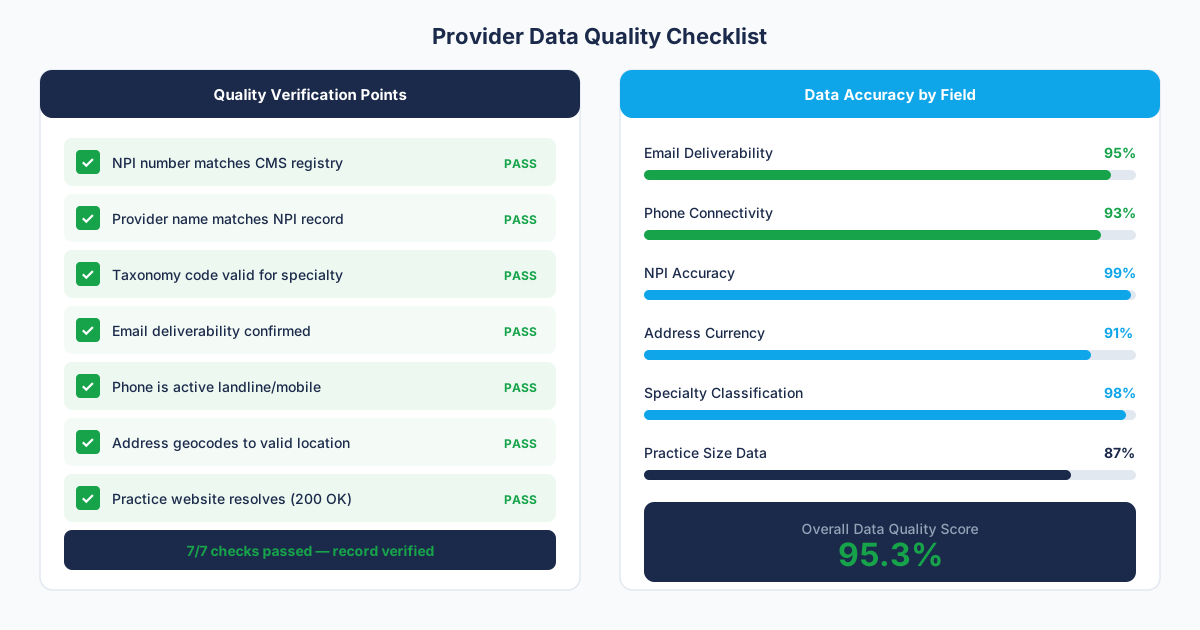
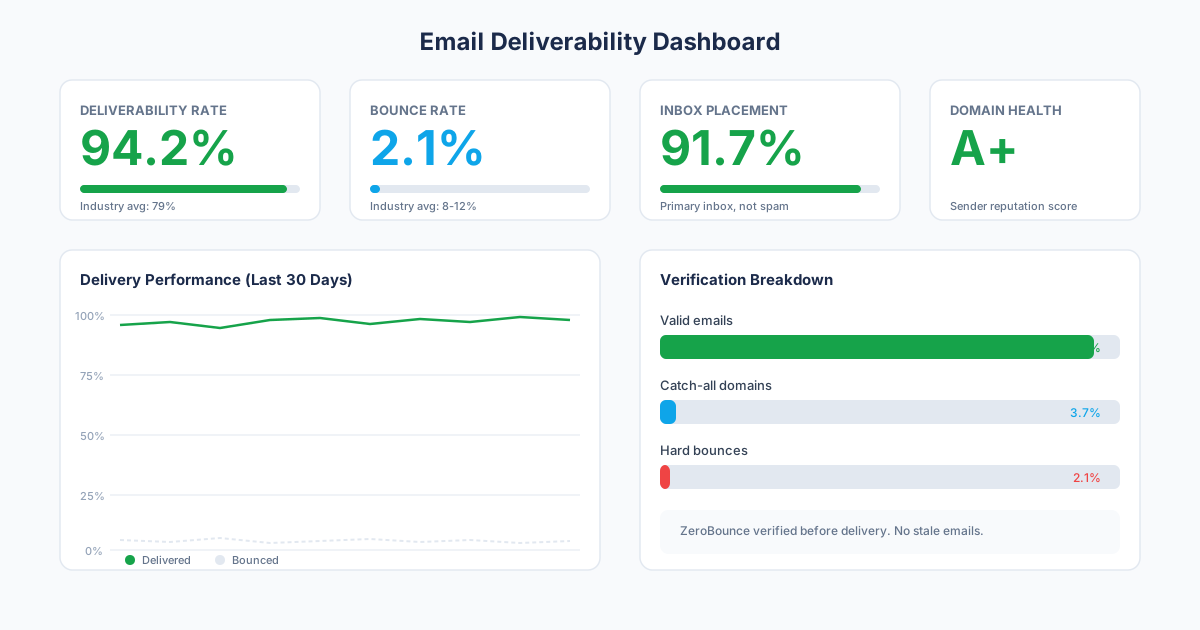
The reviewed records include NPI verification, specialty classifications, practice addresses, phone numbers, email addresses, and where available, practice owner names and firmographic details. Data is delivered as CSV or Excel files with standard CRM column headers.
How Provyx Handles Provider Data for Sales
The key difference is purpose. Provyx builds data products for people who sell to healthcare providers. That means the data model prioritizes contact information (emails, direct lines, decision-maker names) over clinical attributes (insurance panels, quality scores, patient satisfaction).
specialty classification filtering lets you build lists by any clinical specialty: every gastroenterologist in Texas, every pediatric dentist in the Northeast, every psychiatric nurse practitioner in metro areas with populations over 100,000. The filtering is precise because it uses specialty classifications rather than job titles. Source: CMS NPPES files.
Practice-level data maps providers to their actual work locations with contact information for each site. A provider who works at two clinics shows up with two separate location records, each with its own phone number and address. For field reps planning office visits, this granularity matters.
Pricing
The delivery model eliminates the overhead of API integration. A marketing coordinator can request a list, receive a CSV, and import it into HubSpot the same day. No engineering sprint needed.
✓ Strengths
- Built for sales and marketing prospecting workflows
- Deep contact data: emails, direct phones, fax, practice owners
- No developer resources needed; CSV import into any CRM
- provider specialties and subspecialties for precise specialty filtering
✗ Honest Limitations
- No insurance network participation data
- No real-time API for embedding in applications
- US healthcare providers only
Stage-Specific Customer Fit
General B2B Teams
If you're building a patient-facing provider directory or care platform: Ribbon Health is designed for this exact use case. Their API, insurance network data, and quality metrics are built for health plan applications and digital health products. Provyx doesn't compete in this space. Source: https://go.ribbonhealth.com/hubfs/One-Pagers/Ribbon%20Health%20-%20For%20Health%20Plans.pdf.
Healthcare-Focused Teams
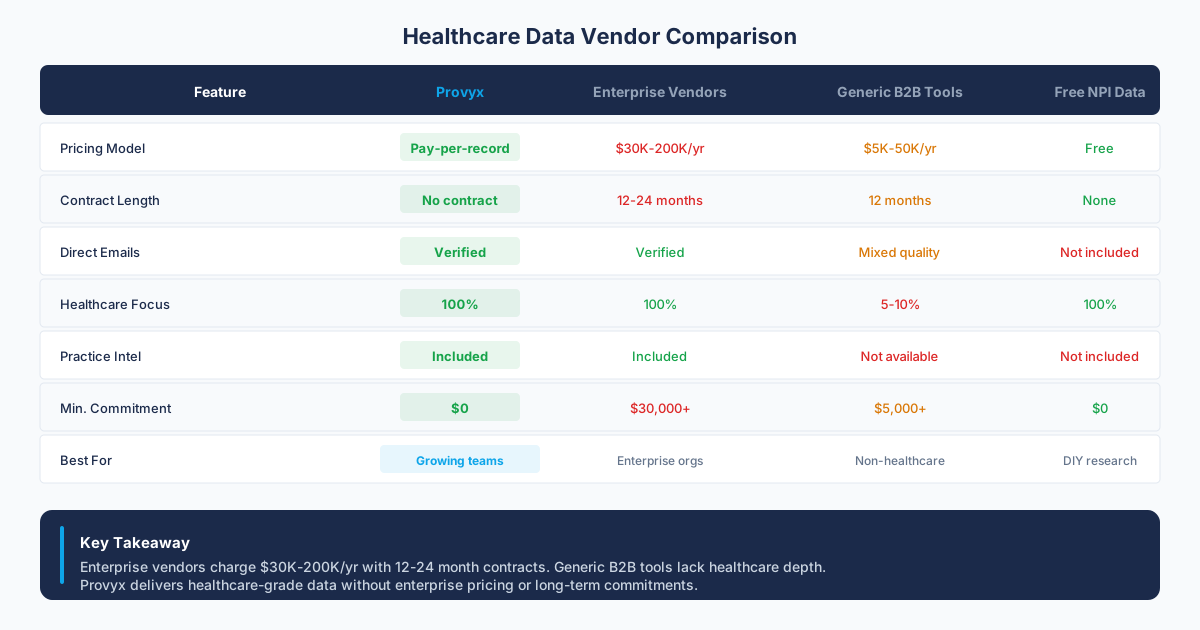
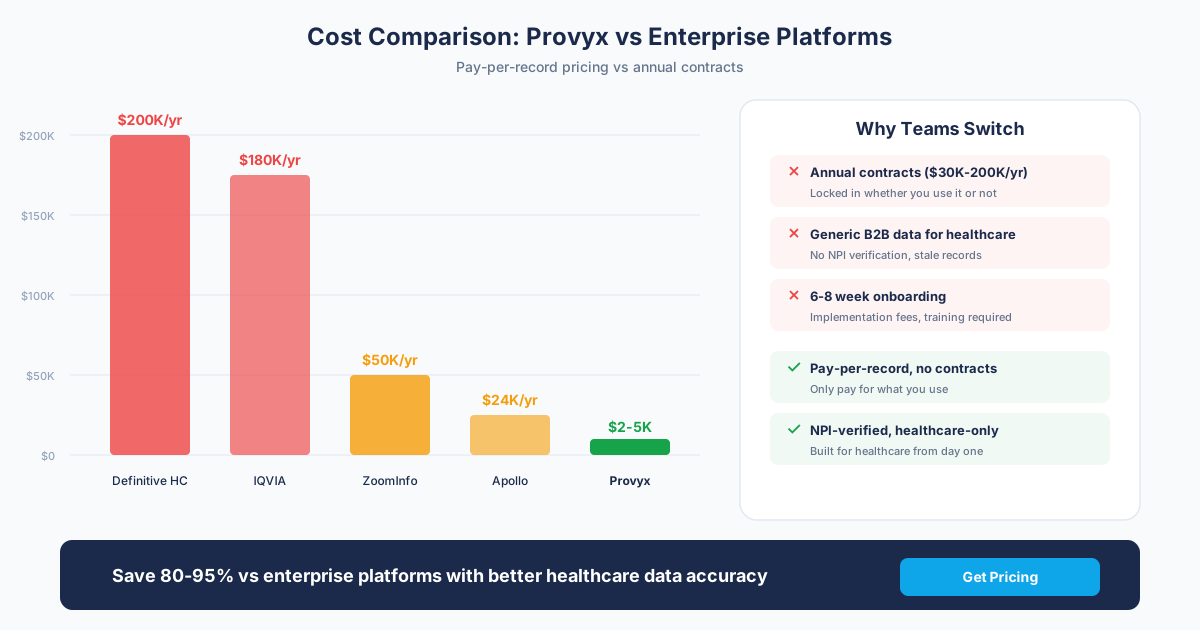
If you're building prospect lists for sales or marketing campaigns: Provyx is designed for this use case. You get NPI-verified provider contact data with emails, phones, and practice details delivered as files you can import into your sales tools. Ribbon's API-first model adds unnecessary complexity for list-based prospecting.
Enterprise Teams
If you need both patient-facing and sales-facing provider data: Use Ribbon for your product's provider directory features and Provyx for your sales team's prospecting data. The use cases are different enough that a single platform rarely serves both well.
Our Recommendation
The Bottom Line
Choose by the job, since these two products barely compete. Ribbon Health powers patient-facing provider search. Provyx builds outreach lists for teams selling to providers.
Pick based on who will use the data:
- Building a product that shows providers to patients or members: Ribbon Health.
- Building prospect lists to sell products or services to providers: Provyx.
- Both: Use each for what it does best.
Questions to Ask Before Signing
- Who is the buyer: your product team or your sales team?: Product teams need APIs. Sales teams need contact lists.
- Do you need insurance network data?: If yes, Ribbon is the clear choice. Provyx focuses on business contact delivery instead.
- Do you need provider email addresses and direct phone numbers?: If yes, Provyx's contact depth serves sales workflows better.
- Do you have engineering resources to integrate an API?: Ribbon requires developer work. Provyx delivers files.
How to Evaluate Ribbon Health and Provyx on the Same Evidence
Start with the decision your team needs to make rather than a long feature inventory. A provider-search product, a network-operations workflow, and an outbound prospecting campaign may use provider data while needing different fields, refresh rules, and delivery patterns. Write the use case in one paragraph and name the downstream system that will consume the result. That framing makes it easier to remove attractive features that do not affect the actual work.
Build a representative test file
Choose records from the specialties, practice settings, and regions your team will use after purchase. Include straightforward records and difficult cases: clinicians with several locations, providers connected to a large organization, practices near a state border, and records where a mailing address differs from a patient-facing office. Give both vendors the same input and the same requested output fields. Do not let either vendor choose an unusually easy demonstration set.
Define each field before the test. For example, decide whether "practice location" means the address registered with the federal identifier, the office shown on the practice website, or each active service location. Decide whether an email needs to belong to the individual, may belong to the practice, or can be a general system inbox. These definitions prevent a high-looking completion rate from hiding records that do not work for your specific workflow.
Score identity, location, and contact data separately
Pay special attention to entity relationships. A clinician may be correctly identified while attached to the wrong practice, or the practice may be correct while the contact channel routes to a parent organization. Those are not interchangeable errors. Keep person, practice, facility, and parent organization as distinct records with explicit links between them. This structure also makes later refreshes easier because one changed relationship does not require replacing the entire record.
Test the delivery model in the real destination
Use a sandbox or a disposable import to test how each result enters the system your team already uses. Check field names, data types, duplicate handling, update behavior, and rejected rows. For a file delivery, save the mapping and import rules so the next batch behaves the same way. For an integrated workflow, document the authentication, retry, monitoring, and exception path. The goal is a repeatable operating process rather than a successful demonstration on a clean screen.
Ribbon describes provider-data and integration capabilities in its current product documentation. Use that documentation to identify which product surface should be tested, then confirm the selected fields and delivery behavior in a written vendor response. For Provyx, put the requested columns, scope, acceptance rules, and delivery format into the written project scope. Compare what each vendor commits to deliver, rather than inferring equivalence from category labels.
Write a decision memo before discussing price
Summarize the test in a short memo that names the use case, sample design, field definitions, failure handling, implementation owner, and unresolved questions. Then request current written commercial terms tied to that exact scope. Separate recurring platform needs from occasional project work and include the staff time needed to research exceptions, map fields, monitor delivery, and maintain the result. A lower quote can still create more work, while a broader product can be unnecessary for a narrow job.
The final choice should be traceable to evidence your team can reproduce. Keep the sample, field-level scorecard, source dates, vendor answers, and import notes together. Schedule the next quality review based on how quickly the fields in your workflow change. That record gives procurement a defensible comparison and gives operations a baseline for deciding whether the selected approach is improving or degrading over time.
How should the Ribbon Health comparison be handed to operations?
Keep three clear review outcomes for each relevant disputed field: accepted, rejected, and unresolved. Do not force an uncertain match into either of the first two groups. Accepted values can move into the destination workflow, rejected values can be excluded, and unresolved values can enter a review queue with the conflicting sources preserved. The same labels should be used for Ribbon Health and Provyx so the comparison reflects evidence rather than different grading rules.
For Ribbon Health, finish with a repeatable refresh plan. Save the source date, the check method, and the reason each volatile field matters to the campaign. Recheck the fields that can change before the next outreach cycle, then compare the new sample with the baseline. If the failure pattern changes, update the acceptance rule and document why. Keep the rejected and unresolved rows too, because they reveal whether the same identity, location, or contact problem returns. Review that evidence with the workflow owner before changing a global rule. A local exception should remain local unless the broader sample supports the change. That feedback loop makes the selection useful after procurement and gives the team a defensible way to reassess the decision later.
What should the final vendor decision record contain?
Keep the decision record compact enough that the operating team will read it. State the selected use case, the accepted field definitions, the evidence standard, the owner of unresolved records, and the destination workflow. Link the representative sample and scorecard rather than copying selected results into a slide. A future reviewer should be able to trace the recommendation back to the tested rows and reproduce the import or integration steps.
Also record what the evaluation did not test. A sample built for provider outreach does not establish performance for network operations, consumer search, or another product surface. Likewise, a workflow test does not prove the selected specialties and geography behaves the same way. Naming those limits keeps a narrow result from becoming a broad marketing claim and gives the next review a useful starting point.
End with an operating handoff. Name who owns imports or integrations, who reviews exceptions, where source evidence is stored, and how the team will report field failures. A vendor selection is incomplete when the buying team understands the product but the people using the data do not understand the acceptance rules. The handoff should make the first refresh as repeatable as the original test.
Distinguish directory operations from outreach delivery
A provider directory, network workflow, care-navigation product, and sales list may share identifiers while serving different users. Define the consumer, update path, field meanings, and acceptable uncertainty for each job before comparing the underlying data.
Use a sample with multi-location clinicians, network relationships, facility parents, independent practices, and recent changes. Score provider identity, locations, affiliations, business contacts, provenance, and unresolved records separately. Avoid treating one aggregate accuracy measure as proof for the reviewed fields.
Test the API or file handoff in context
Map the sample into a disposable destination and inspect identifiers, schema, update precedence, deletes, merges, rejected records, and corrections. Name the system that owns each accepted field and the team that resolves exceptions.
Record what the evaluation did not test. A directory sample cannot establish outreach suitability, and an outreach file cannot establish network adequacy or consumer-search behavior. Keeping those boundaries visible protects the decision from expanding beyond its evidence.
Start with the application consuming the data
A consumer directory, network workflow, care-navigation experience, and sales campaign may use the same provider identifier while requiring different fields and update behavior. Write the user action, latency expectation, correction path, and acceptable uncertainty for the intended application before reviewing a sample.
For directory use, inspect locations, specialties, network relationships, organization links, and change handling. For outreach, inspect provider identity, current practice, business contact channel, provenance, and suppression workflow. Do not combine those scores; a strong result for one application does not establish fitness for the other.
Test the handoff, not only the returned row
Exercise the proposed API or file handoff in a disposable environment. Review identifiers, field meanings, pagination or batching, merges, deletes, stale relationships, rejected records, and corrections. Name the system that owns each accepted field after the handoff.
Include ambiguous multi-location and parent-child relationships in the sample. Keep candidate values and observation dates when the sources disagree. The exception path should tell operators whether to display, suppress, research, or defer a value.
Close the evaluation with boundaries and ownership. Record which product workflow receives the data, which team handles quality issues, and what evidence triggers a change. Save the test fixtures so later schema or source changes can be checked against the same cases.
Frequently Asked Questions
Is Ribbon Health a direct competitor to Provyx?
Not directly. Ribbon Health serves health plans and digital health platforms with API-based provider directory data. Provyx serves sales and marketing teams with file-based provider contact data. These are in the same data category but serve different buyers and use cases. Source: https://go.ribbonhealth.com/hubfs/One-Pagers/Ribbon%20Health%20-%20For%20Health%20Plans.pdf.
Does Ribbon Health provide email addresses for providers?
Ribbon's data model focuses on practice locations, specialties, and insurance participation rather than individual contact details like validated business emails and direct phone numbers. If your primary need is email-based outreach to providers, a sales-focused data platform like Provyx provides deeper contact coverage.
Can I use Ribbon Health for sales prospecting?
Technically, Ribbon's API returns provider data that could inform prospecting. Practically, setting up API integrations, parsing responses, and supplementing with contact data adds significant overhead compared to a platform that delivers sales-ready provider lists directly.
Does Ribbon Health include insurance network data?
Yes. Insurance network participation is one of Ribbon's core data assets. This is valuable for health plan applications and care navigation but irrelevant for B2B sales teams targeting providers. Provyx does not include insurance network data.
What's the best choice for a healthcare SaaS company?
It depends on which team is buying. If your product team needs provider data for your application's features, Ribbon's API is built for that. If your sales team needs provider lists for outbound prospecting, Provyx is built for that. Many healthcare SaaS companies use both.
Get the Provider Data You Need
Tell us what you're looking for. We'll build a custom list matched to your target market.
Trusted by healthcare sales teams, medical device companies, and health IT vendors across the US.