Provyx vs Lusha: Healthcare Provider Data Compared
Compare Lusha and Provyx against the same use case, fields, evidence standard, and delivery workflow. Review the current Lusha product documentation alongside the written Provyx scope before deciding.
Updated April 2026
This comparison is for healthcare sales and marketing teams that are evaluating Lusha alongside Provyx, or that have already tried Lusha and found gaps in their provider outreach. We'll compare the two platforms on data depth, healthcare-specific capabilities, pricing, and the practical differences that show up when you're trying to reach physicians, nurse practitioners, and practice managers rather than VP-level buyers at SaaS companies. Source: Lusha product documentation.
Lusha vs. Provyx at a Glance
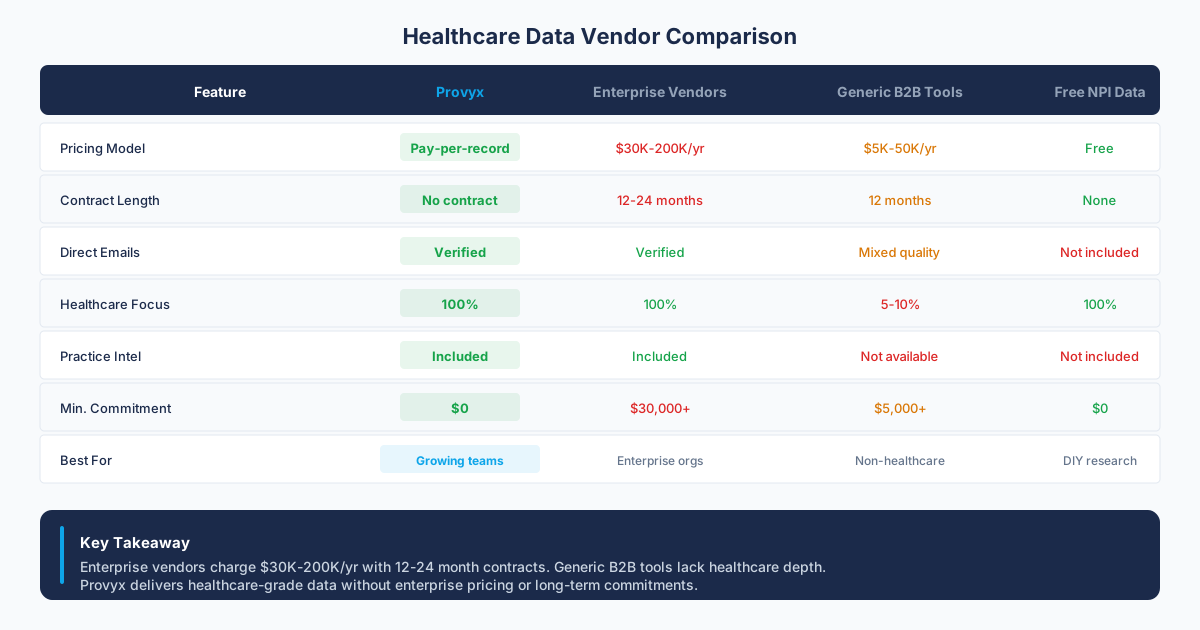
| Factor | Lusha | Provyx |
|---|---|---|
| Starting Price | Confirm in current vendor documentation or a written quote | Per validated contact No Subscription |
| Contract Terms | Confirm in current vendor documentation or a written quote | |
| Healthcare Focus | General B2B No Healthcare | Verify the measured value and observation date before use. |
| NPI Verification | Not available No NPI | Every record NPI-Verified |
| specialty filtering | Not available No classification | Verify the measured value and observation date before use. |
| Data Delivery | Chrome extension + platform LinkedIn Integration | CSV or Excel Bulk Delivery |
| Best For | LinkedIn prospecting across general B2B | Teams selling exclusively into healthcare |
| Key Risk | No provider identifiers Shallow Data | No LinkedIn extension Data Only |
Lusha

Lusha
Lusha Product Scope
The platform's signature feature is its Chrome extension. When you visit a LinkedIn profile, the extension surfaces the contact's email address, phone number, company details, and job title in a sidebar. For sales reps who spend their prospecting hours on LinkedIn, this workflow is efficient. You find someone, you get their contact info, and you add them to your CRM or outreach sequence in seconds. The friction is minimal, and the time-to-first-touch is fast compared to traditional data platforms that require logging into a separate tool.
Where Lusha was designed to excel is in helping sales development reps at tech companies, agencies, and professional services firms find and contact their prospects quickly. This is a lightweight, focused tool that does one thing well: turning LinkedIn profiles into actionable contact records. For that specific job, it performs.
Pricing and Contracts
Credits are consumed when you reveal a contact's information. One credit unlocks one phone number, and one credit unlocks one email address. If you need both an email and a phone number for the same contact; this is two credits. For teams running high-volume outbound, credits can deplete faster than expected, particularly if you're building initial prospect lists for a new territory or campaign.
Where Lusha Falls Short for Healthcare Teams
No NPI data at all. Lusha's published product materials do not list National Provider Identifier numbers or CMS registry verification for contacts against the CMS NPI Registry. That means you can't confirm whether a contact is an active, licensed healthcare provider. A "Doctor" on LinkedIn could be a practicing cardiologist, a retired dermatologist, a PhD researcher, or someone who just lists "Dr." as a courtesy title. Without NPI verification, you're guessing.
No practice-level location data. Lusha associates contacts with company records, and the addresses attached to those records are typically corporate headquarters or the primary office listed on the company's website. For healthcare; this is often a hospital system's administrative building rather than the clinic where a provider sees patients. If your field reps need to know which specific office to visit, or your direct mail campaign needs the right practice address, Lusha's location data won't get you there. Source: https://www.lusha.com/lusha-extension/.
✓ Strengths
- Chrome extension for quick LinkedIn prospecting
- Simple, easy-to-learn interface
- Good CRM integrations (Salesforce, HubSpot)
✗ Weaknesses
- No NPI verification for healthcare providers
- No specialty classification filtering for clinical specialties
- Credit-based system with strict monthly caps
- No practice-level data (direct lines, fax, practice address)
- Healthcare specialty data limited to generic job titles
Sources and References
Provyx

Provyx
What Provyx Delivers
Provyx is a healthcare provider business data platform. A reviewed record in the database represents a healthcare provider or practice location, verified against the National Provider Identifier Registry maintained by CMS. There's no cross-industry data, no Chrome extension for LinkedIn, and no built-in email sequencing. Provyx does one thing: it delivers accurate, targetable healthcare provider contact intelligence.
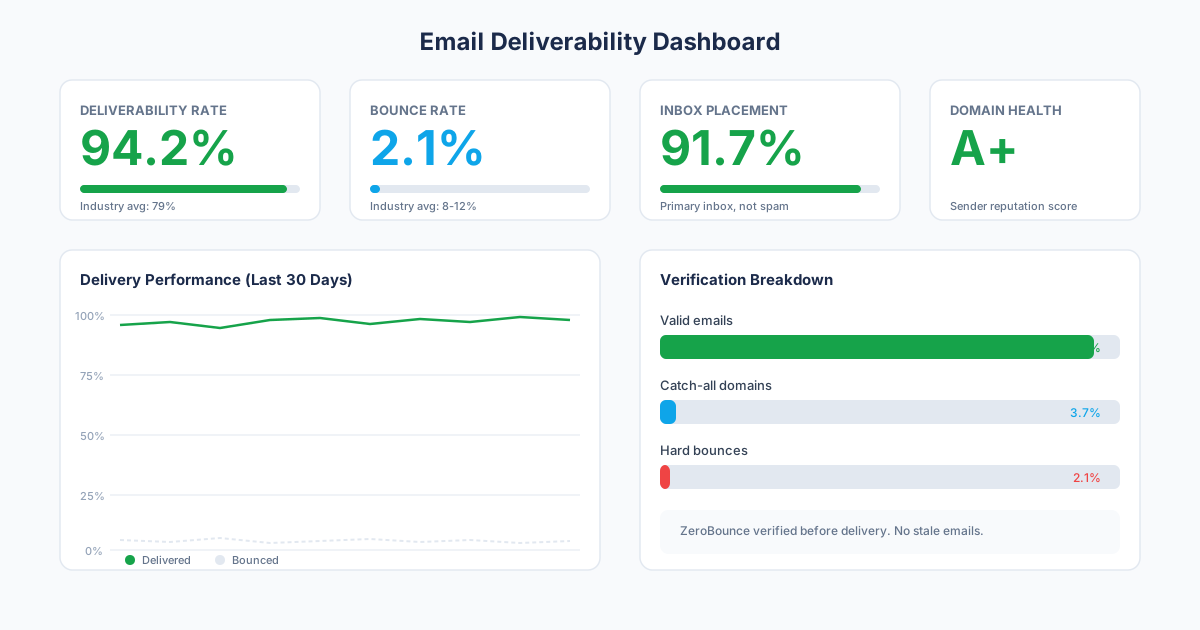
The database covers physicians, nurse practitioners, physician assistants, dentists, optometrists, chiropractors, physical therapists, behavioral health providers, and other licensed clinicians across the United States. Records include NPI numbers, specialty classifications, practice addresses, phone numbers, email addresses, and affiliated organizations.
Data is sourced from public NPI registries, business listings, state licensing boards, and commercial databases. Provyx doesn't rely on crowdsourced community data or LinkedIn profile scraping. The sourcing methodology was built for a market where provider credentials matter and where the people you're trying to reach often don't have a digital footprint on business social networks.
How Provyx Handles Healthcare Provider Business Data
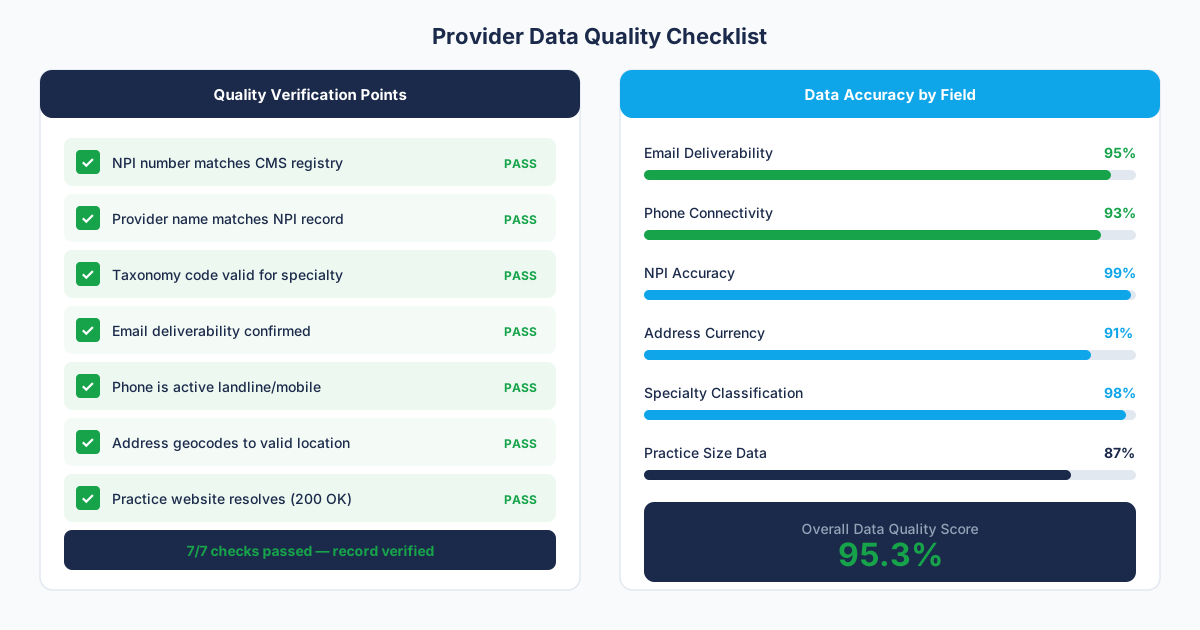
NPI verification is the foundation of Provyx records. Each contact is matched against the CMS NPI Registry, which confirms that the provider holds a valid national identifier and is a real, identifiable healthcare professional. This eliminates a class of problems that general platforms can't solve: Is this contact a physician? Are they still practicing? What's their real clinical specialty? The NPI record answers the three.
Practice-level location data maps providers to the specific clinics, offices, and facilities where they see patients. A physician who works at a hospital system and also runs a private practice appears with both locations and separate contact details for each. This is critical for field sales teams, territory planning, and direct mail campaigns that need to reach the right physical address, beyond a hospital system's administrative headquarters.
Data transparency is built into the sourcing model. Every record traces back to a public NPI registry entry, a state licensing board record, or a verified business listing. If your compliance team asks where the data came from, the answer is straightforward and auditable. In healthcare, that clarity matters. Compliance teams at medical device companies and pharmaceutical firms often need to document data provenance before approving outreach campaigns. Provyx makes that documentation simple. Source: CMS NPPES files.
Pricing
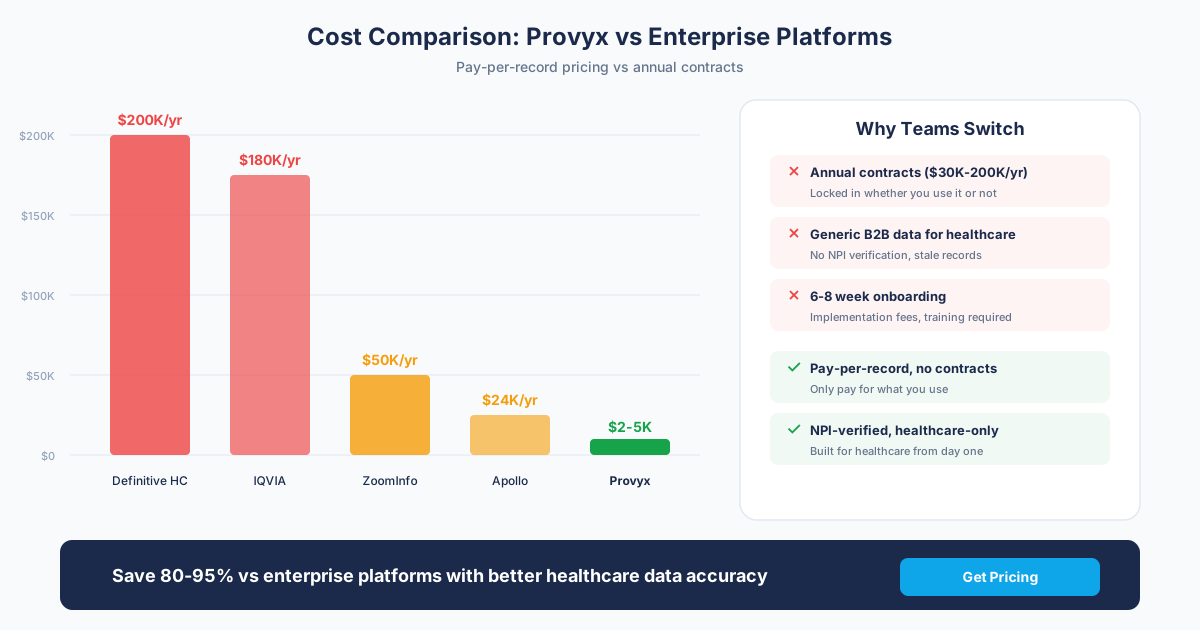
Provyx uses a project-based model. You buy the records you need, when you need them. There's no monthly subscription, no annual contract, no auto-renewal, and no credit system that forces you to use or lose a set number of reveals each month. You pay only for contacts delivered with a validated email, and the per-contact price drops with volume. Source: current Provyx scope and pricing.
There are no seat-based licenses. Your entire team, from the SDR to the VP of Sales, can access and use the records you've purchased. Data is delivered as CSV or Excel with standard CRM column headers. Once you've bought the records; these are yours.
✓ Strengths
- Records checked against the CMS NPI Registry
- provider specialties and subspecialties for specialty targeting
- Practice-level data: direct phone, fax, address, owner
- Bulk list delivery (not one-at-a-time lookups)
- No credit caps or per-user seat licensing
✗ Honest Limitations
- No Chrome extension or LinkedIn integration
- No real-time contact lookups from web browsing
- Healthcare providers only; no general B2B data
- No built-in email sequencer or engagement tools
Stage-Specific Customer Fit
General B2B Teams
Healthcare-Focused Teams
If you need healthcare provider contact intelligence: Provyx was built for this. You'll get NPI-verified records, specialty classification filtering across 800+ specialties, and practice-level addresses that map providers to the specific clinics where they see patients. Every record arrives with the identifiers healthcare sales teams need: NPI numbers, specialty codes, and verified contact details sourced from public registries and commercial databases. The project-based model means you're buying exactly the records your campaign requires, with no monthly credit pressure. If 100% of your pipeline comes from healthcare providers, a specialized data platform will outperform a general tool on every metric that matters: targeting precision, contact accuracy, and cost per qualified record. Source: CMS NPPES files.
Enterprise Teams
Our Recommendation
The Bottom Line
Lusha and Provyx solve materially different problems. Lusha is a point-and-click prospecting tool for LinkedIn. Provyx is a healthcare data platform for building targeted provider lists at scale.
The smart play:
- LinkedIn-first teams: Lusha's Chrome extension is unbeatable for grabbing individual contacts from profiles.
- Healthcare outreach teams: Provyx delivers verified provider lists with NPI, classification, and practice data that Lusha can't match.
- Using both: Use Lusha for ad-hoc LinkedIn research and Provyx for systematic healthcare campaign list building.
Questions to Ask Before Signing
- Do you need NPI numbers in your records?: If yes, Lusha doesn't have them. Full stop.
- Are you building lists or doing one-off lookups?: Lusha excels at individual lookups; Provyx excels at bulk list building.
- Do your campaigns require specialty-based targeting?: Filtering by psychiatrist vs. Psychologist vs. Counselor requires specialty classifications.
- What practice-level data do you need?: Direct phone, fax, practice address, and owner aren't in Lusha.
How should the Lusha comparison be handed to operations?
Keep three clear review outcomes for each relevant disputed field: accepted, rejected, and unresolved. Do not force an uncertain match into either of the first two groups. Accepted values can move into the destination workflow, rejected values can be excluded, and unresolved values can enter a review queue with the conflicting sources preserved. The same labels should be used for Lusha and Provyx so the comparison reflects evidence rather than different grading rules.
For Lusha, finish with a repeatable refresh plan. Save the source date, the check method, and the reason each volatile field matters to the campaign. Recheck the fields that can change before the next outreach cycle, then compare the new sample with the baseline. If the failure pattern changes, update the acceptance rule and document why. Keep the rejected and unresolved rows too, because they reveal whether the same identity, location, or contact problem returns. Review that evidence with the workflow owner before changing a global rule. A local exception should remain local unless the broader sample supports the change. That feedback loop makes the selection useful after procurement and gives the team a defensible way to reassess the decision later.
How should you test Lusha and Provyx?
Give each vendor the same representative provider sample, define each needed field, and record pass, fail, and unresolved outcomes. Compare the usable result and the work needed to import it into your actual outreach process.
Keep provider identity, current practice, specialty, business email, and phone as separate checks. A record can identify the right person while still pointing to an old organization or an unusable channel. Use the same sources and the same check date for both files, and preserve the evidence beside each relevant disputed row.
Run a disposable import before choosing the workflow. Confirm field mapping, duplicate handling, rejected rows, and the process for correcting a bad value. The decision should reflect the work your team will repeat after the test as well as the appearance of the vendor interface during a demonstration.
What belongs in the compare provyx vs lusha evaluation record?
The compare provyx vs lusha evaluation record should begin with the job the data will perform. Name the audience, destination workflow, fields used by that workflow, and the source that resolves conflicting values. Keep provider identity separate from practice identity, and keep both separate from the parent organization. That structure lets the review team see whether a failure belongs to the person, the location, the relationship, or the contact channel.
Define the acceptance rule before reviewing a sample
Keep disagreements visible
Test the operating handoff
Preserve a baseline for the next review
Test browser research and campaign-list work separately
A browser-assisted lookup begins with a person or company already in view. A campaign build begins with a defined provider population and then resolves contacts. Treat those as separate workflows in the evaluation so speed on an individual lookup does not stand in for completeness across a territory.
Choose providers with similar names, several practice relationships, health-system employment, and independent offices. Confirm identity before scoring employer, care-delivery location, business email, and phone. Record the evidence for accepted and unresolved matches.
Inspect the path from reveal to CRM
Test where a revealed contact is stored, which fields overwrite existing values, how duplicates are detected, and how a correction reaches downstream records. Keep a copy of the source page and check date because professional profiles and company pages change.
For bulk work, review sampling and exception handling. The evaluator should see missing contacts, ambiguous companies, headquarters addresses, and uncertain channels rather than only the successful reveals. That makes the operating cost visible before the team chooses a workflow.
Observe the browser-assisted research workflow
Ask researchers to work a frozen provider sample that includes common names, several care sites, corporate domains, and small practices. Record how they decide which company and profile belong to the clinician. A revealed channel is useful only after the identity and current practice relationship are resolved.
Track unresolved candidates and rejected matches as first-class outcomes. Inspect whether evidence remains visible after the record enters the CRM and whether a correction in the research step reaches downstream users. Shared office numbers and general inboxes should remain labeled as organization channels.
Separate credits from research effort
Document the actions that consume workflow capacity and the manual steps around them, then apply the proposed plan allowances to the frozen sample. Keep capacity planning separate from identity review so interface convenience does not change how a match is judged.
Have the people who perform daily research review the exception queue. Their assessment should cover time spent resolving employers, practice locations, and ambiguous channels, plus the path for records that remain unknown. Save the tested rows and decisions for the next refresh.
Frequently Asked Questions
How should a healthcare outreach sample be evaluated?
Do not infer Lusha performance for healthcare from review summaries or cross-industry averages. Request a representative sample and test provider identity, specialty, practice location, business email, and phone using the same field-level acceptance rules and check date used for each relevant vendor.
How should buyers test a Lusha healthcare sample?
Use current providers from the specialties and practice settings the campaign targets. Review identity, employer, practice location, business email, phone, and unresolved matches separately. Source: https://docs.lusha.com/user-guide/extension/extension-overview.
Which browser-extension workflow details matter?
Document where researchers reveal contacts, how records enter the CRM, which fields overwrite existing values, and how corrections propagate. Include credit and permission handling in the test plan. Source: https://docs.lusha.com/user-guide/extension/extension-overview.
How should practice locations be checked?
Compare the company address with the provider's current care-delivery site and health-system relationship. Keep corporate, billing, and practice locations as separate fields. Source: https://docs.lusha.com/user-guide/extension/extension-overview.
What belongs in the final evaluation note?
Record the selected use case, sample, field results, source dates, workflow effort, unresolved records, and the owner of post-purchase exceptions. Link the tested rows rather than summarizing them away. Source: https://docs.lusha.com/user-guide/extension/extension-overview.
Get the Provider Data You Need
Tell us what you're looking for. We'll build a custom list matched to your target market.
Trusted by healthcare sales teams, medical device companies, and health IT vendors across the US.
Review evidence at the moment of acceptance
Ask researchers to capture the profile, company association, practice source, and check date when they accept a contact. If the tool exposes several candidates, preserve the rejected candidates and the reason for choosing one. This makes false matches easier to diagnose after delivery outcomes arrive.
Test shared domains and small practices separately. A company-domain pattern may be useful at a large organization but misleading for an independent office using a hosted mailbox or a group scheduling address. Keep inferred, observed, and validated channels distinct in the output.
Define the correction loop
Use known departed contacts, moved clinicians, and changed practice websites to trace correction handling. Record whether the change remains local to one user, updates a shared record, or needs a separate request. Tell downstream operators which source wins while the conflict is open.
At the end of the trial, compare time spent researching, resolving, importing, and correcting the sample. Keep those observations beside the field-level results so the selection reflects the work involved in the planned campaign.
Ask the campaign operator to identify which unresolved records can wait, which need research before enrollment, and which should remain suppressed. This turns the exception file into an operating decision instead of a hidden quality score. Review the same queue after a small working batch and attach delivery outcomes to the accepted source evidence. Use disagreements to refine the acceptance rule, while keeping the original sample intact for comparison. Document whether the correction belongs in the research process, CRM mapping, or campaign operation. Give the researcher a short guide for shared inboxes, company changes, similar names, and several-location providers. Review the guide against the preserved edge cases, then keep accepted and rejected examples beside each rule so later operators can apply it consistently.